
Features
Nav0 includes only the features essential for a clean browsing experience. Nothing more. This page is a tour of every surface a user touches, with screenshots of the real UI.
Core Features
Tab Management
A full tab strip with the behaviours you expect from a modern browser, and none of the chrome you do not. Read the full Tab Management guide →
- Unlimited tabs, with a horizontally scrollable strip that enforces a minimum readable width so tabs never collapse into unreadable slivers.
- Hover previews of the page title and URL on every tab.
- Drag to reorder within a window, or drag a tab off the strip to detach it into a new window.
- Middle-click to close, right-click for a context menu (Reload, Close, Duplicate, Mute/Unmute, Close Other Tabs).
- Pin tabs to keep them compact and persistent across sessions.
- Move tabs between windows from the right-click menu or via the Cmd+O switcher's drag-and-drop.
- Restore recently closed tabs — including full window restoration, with the same set of tabs, scroll positions, and order.
- Background loading — new tabs open without stealing focus from the page you are reading.
- Loading spinner in the favicon slot while a page is in flight.
- Tab hibernation — tabs untouched for 72+ hours are automatically suspended to free memory; they reload on demand the next time you click them.
Cmd+O Tab Switcher
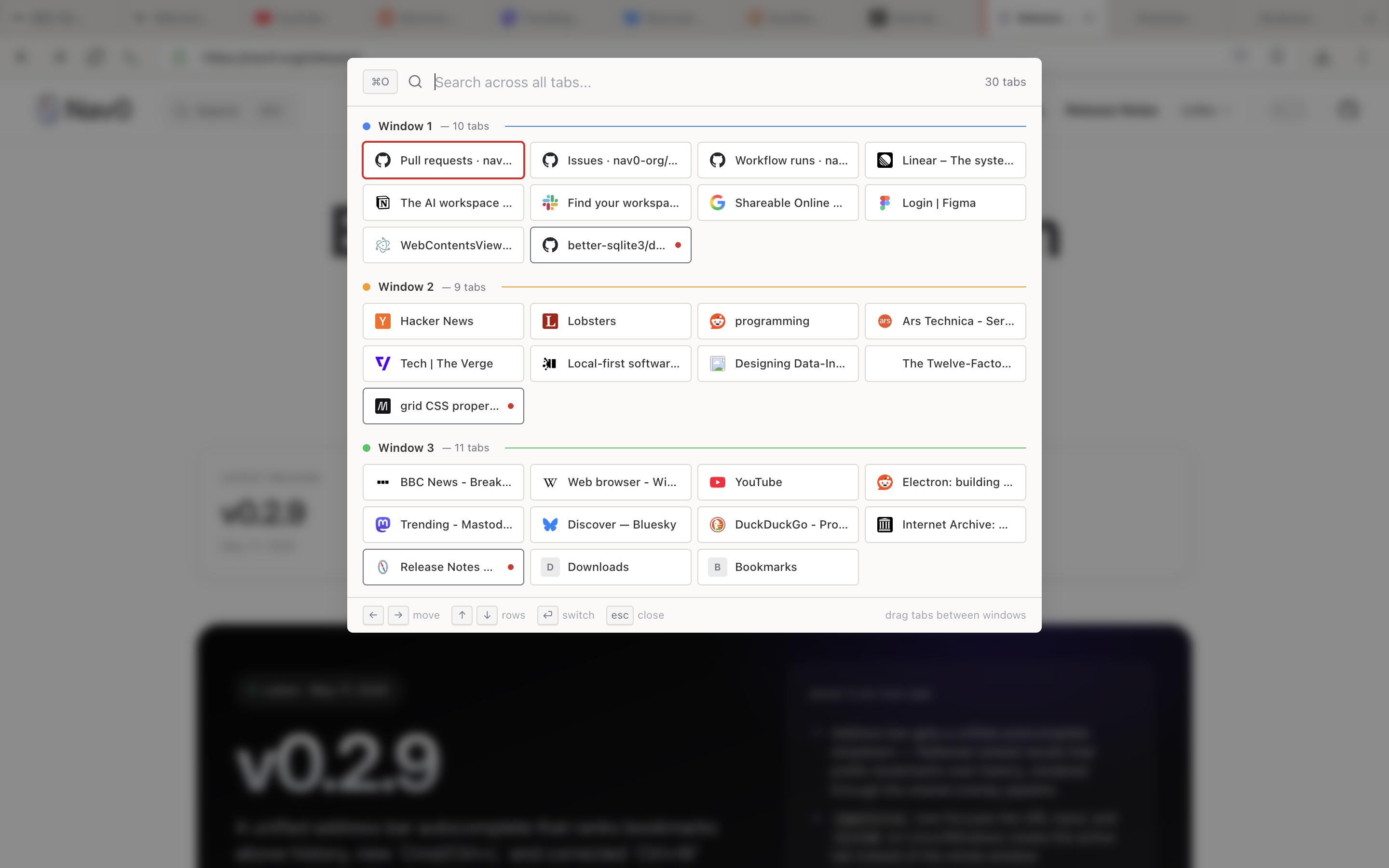
A cross-window tab switcher. Press Cmd+O (or Ctrl+O on Windows/Linux) to see every open tab across every window in one grid, grouped by window with a count next to each header. Drag a tab from one window's group into another to move it across windows without losing its session state.
- Live search across all tab titles and URLs
- Grouped per-window view with live counts ("Window 1 — 10 tabs")
- Drag and drop tabs between window groups
- Keyboard navigation: arrow keys move within a group, Enter switches, Esc closes
- Filtered by private/non-private context so private tabs never leak into normal-mode results
Cmd+K Command Palette
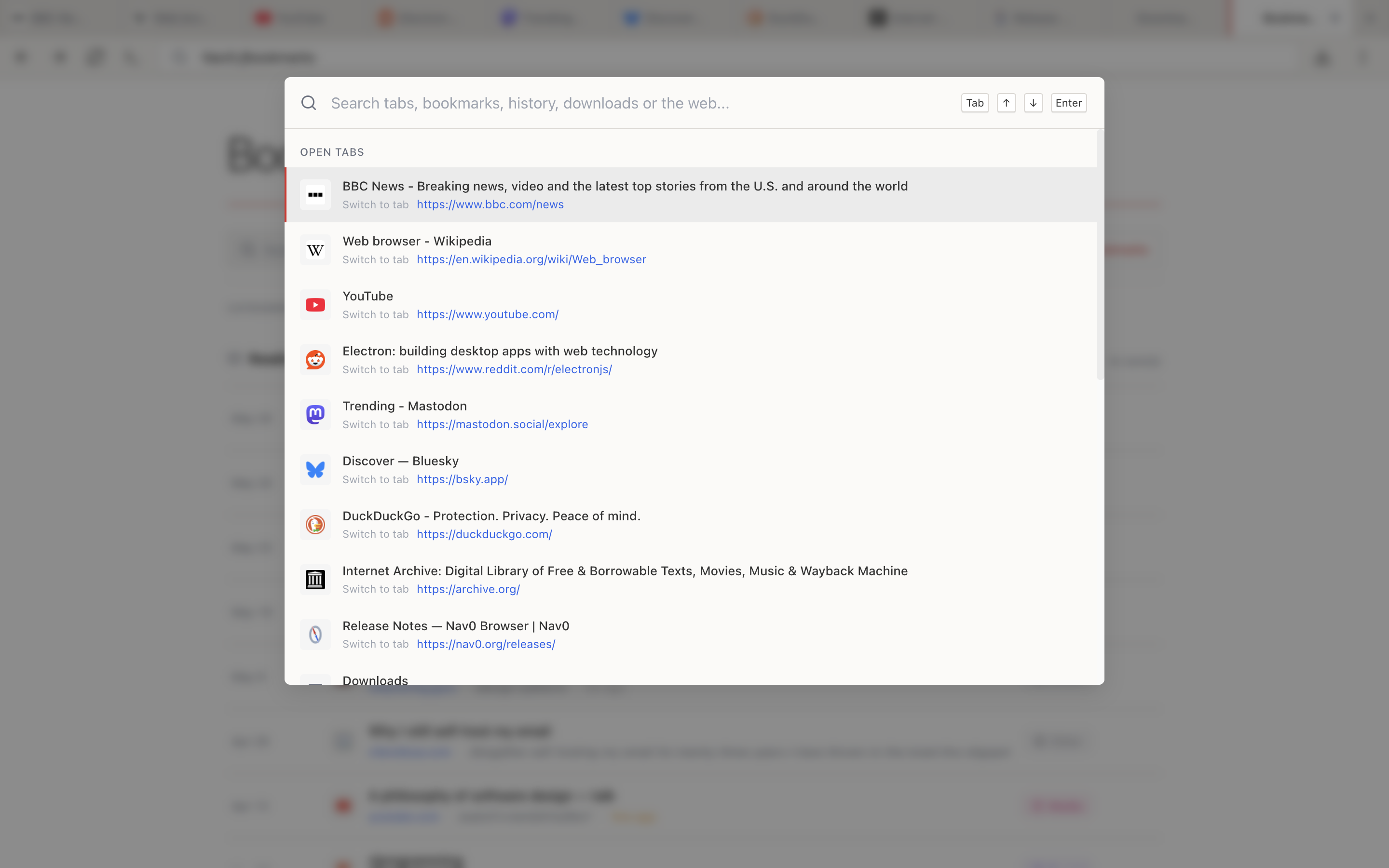
One palette for everything you might want to navigate to. Press Cmd+K (or Ctrl+K) to search open tabs, bookmarks, history, downloads, or the open web from a single input. Hits are grouped by source so you can tell at a glance whether a result is an open tab to switch to or a new page to load.
- Open tabs appear first with a "Switch to tab" action so you do not accidentally open a duplicate
- Bookmarks, history, and downloads are searched in parallel, ranked by recency and frequency
- Web search as a fallback, using your configured default engine
- Full keyboard navigation: ↑/↓ to move, Tab to cycle result groups, Enter to open, Esc to dismiss
Bookmarks
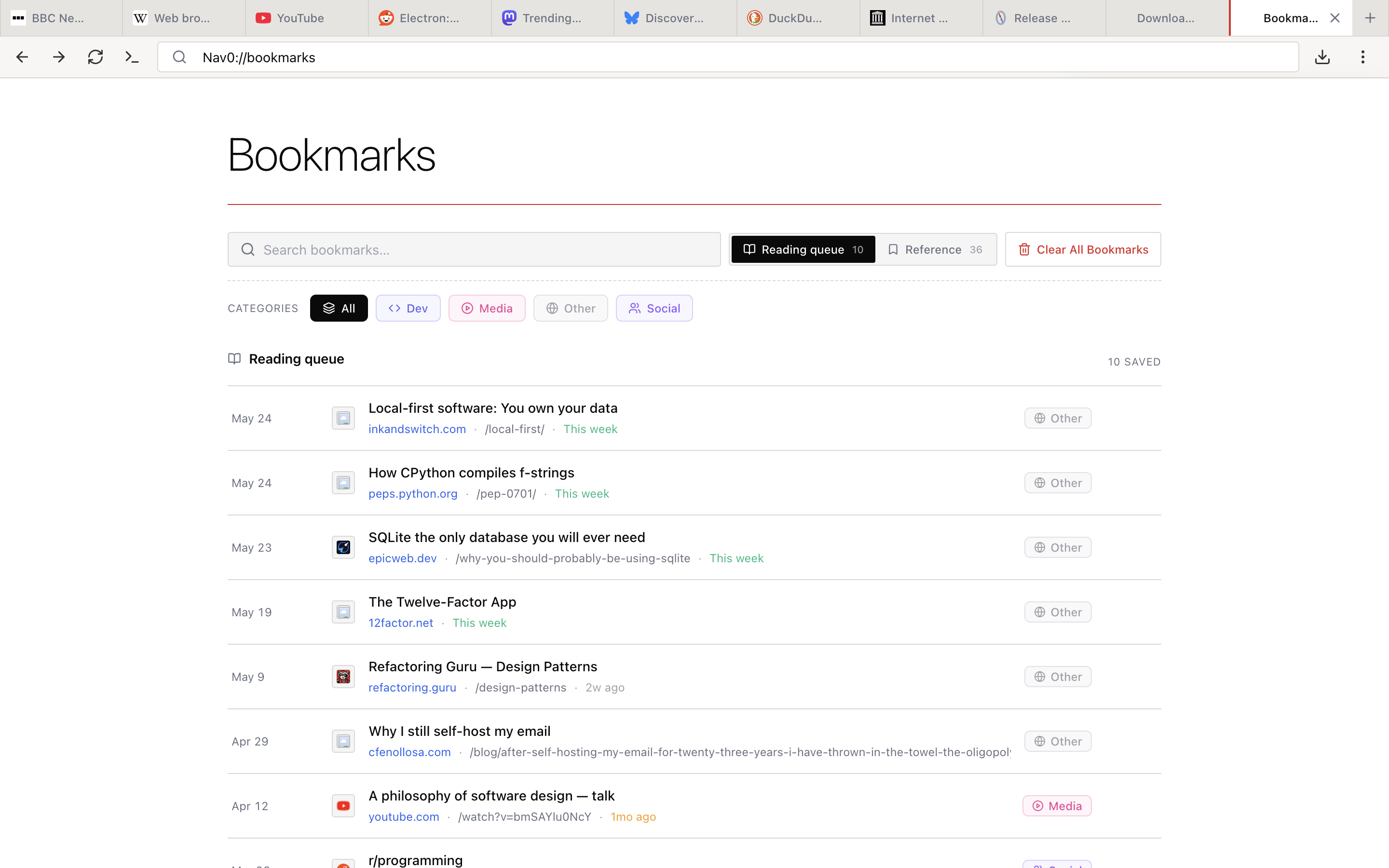
Bookmarks live entirely on your device — no account, no sync server, no cloud round-trip when you add or open one. The Bookmarks page at nav0://bookmarks is built around two lists you actually use: a Reading queue for "I'll come back to this" pages, and a Reference library for things you keep returning to. Each entry is tagged with a category (Dev, Media, Social, Other) for filtering.
- One-click add from the address bar
- Reading queue and Reference as first-class lists, not buried folders
- Category filters (Dev, Media, Social, Other) plus an All view
- Per-entry metadata — source, path, "this week" / "2w ago" recency labels
- Search across titles, hosts, and paths
- Clear All Bookmarks when you want a fresh start
- Import/export in the standard Netscape bookmarks HTML format, so you can move data in or out of any other browser
History
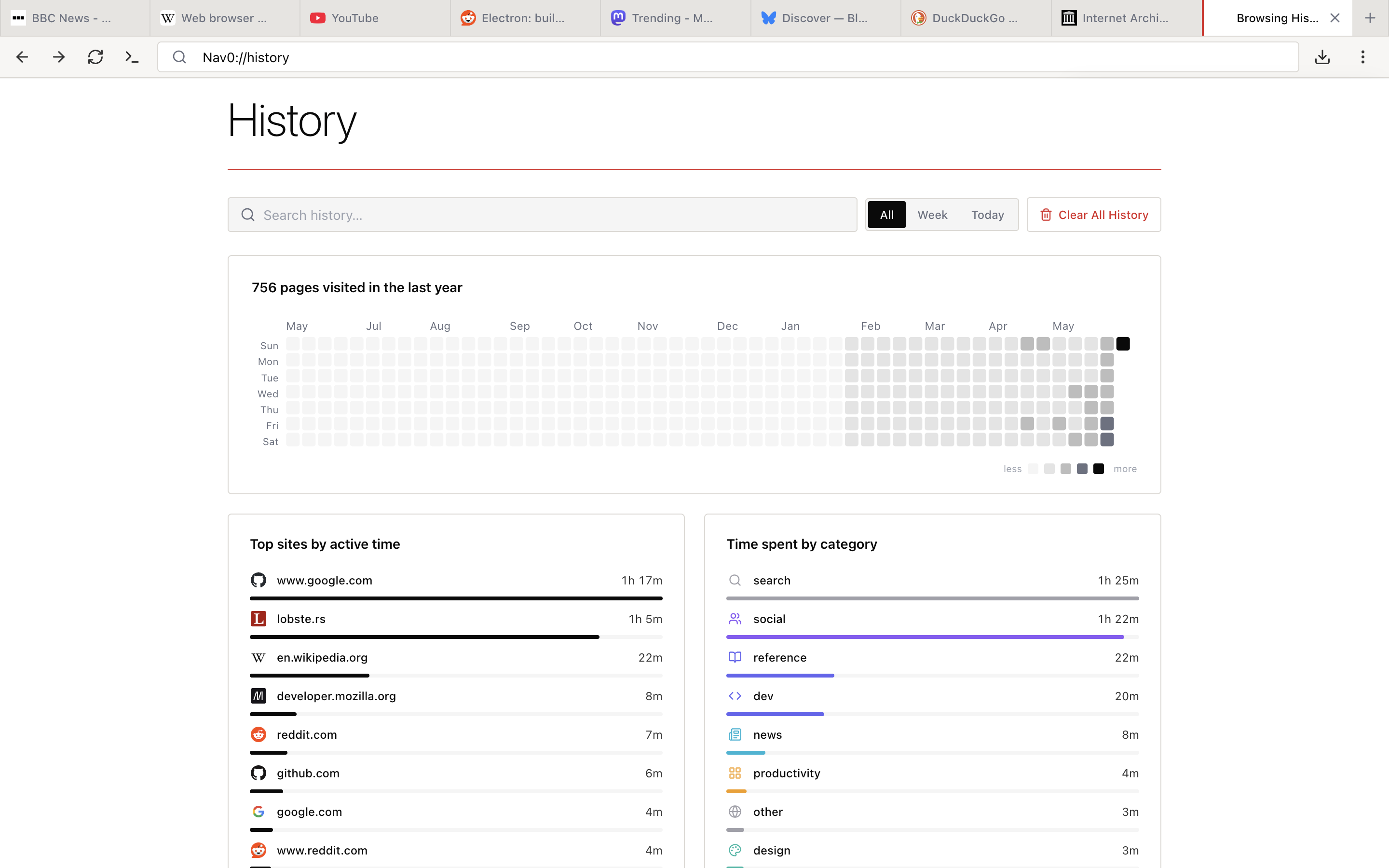
Your browsing history is stored locally and never sent anywhere. The history page is split into an analytics overview and a chronological list, both built entirely from your local database.
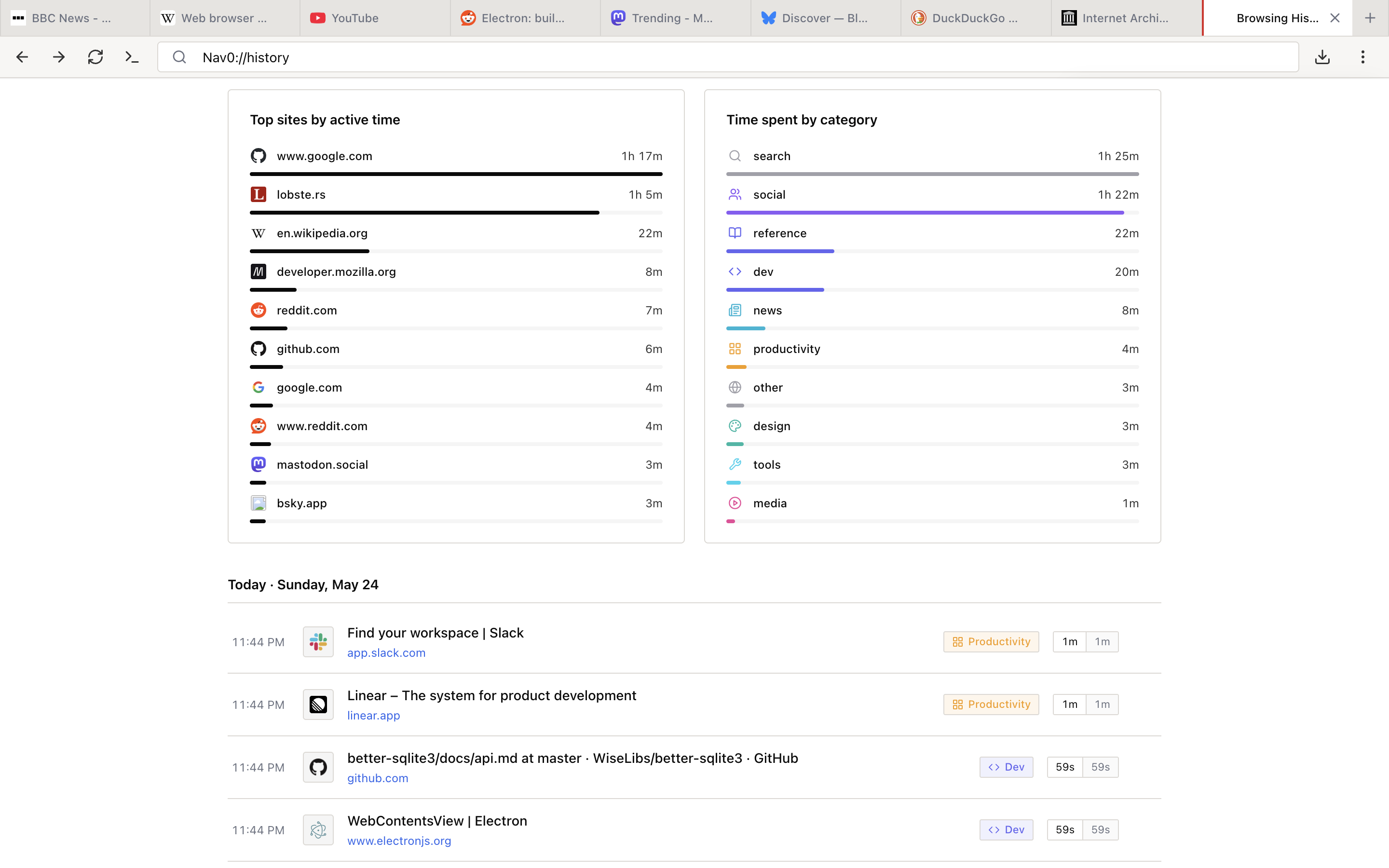
Analytics overview — a year-long activity heatmap (GitHub-contributions style), a list of top sites by active time, and a "Time spent by category" breakdown that classifies your sites into buckets like search, social, dev, reference, news, productivity, design, and media:
Chronological view — every page you visited, grouped by day, with the category tag and active time on each row. Filter to today, this week, or all time; search by title or URL; clear by range or all at once.
- Local storage only — no history sent anywhere, ever
- Year heatmap, top sites, and time-by-category, all derived locally
- Per-entry active time (e.g. "1m", "59s") so you know what you actually engaged with vs. what you clicked through
- All/Week/Today filters, plus full-text search
- One-click Clear All History
Downloads
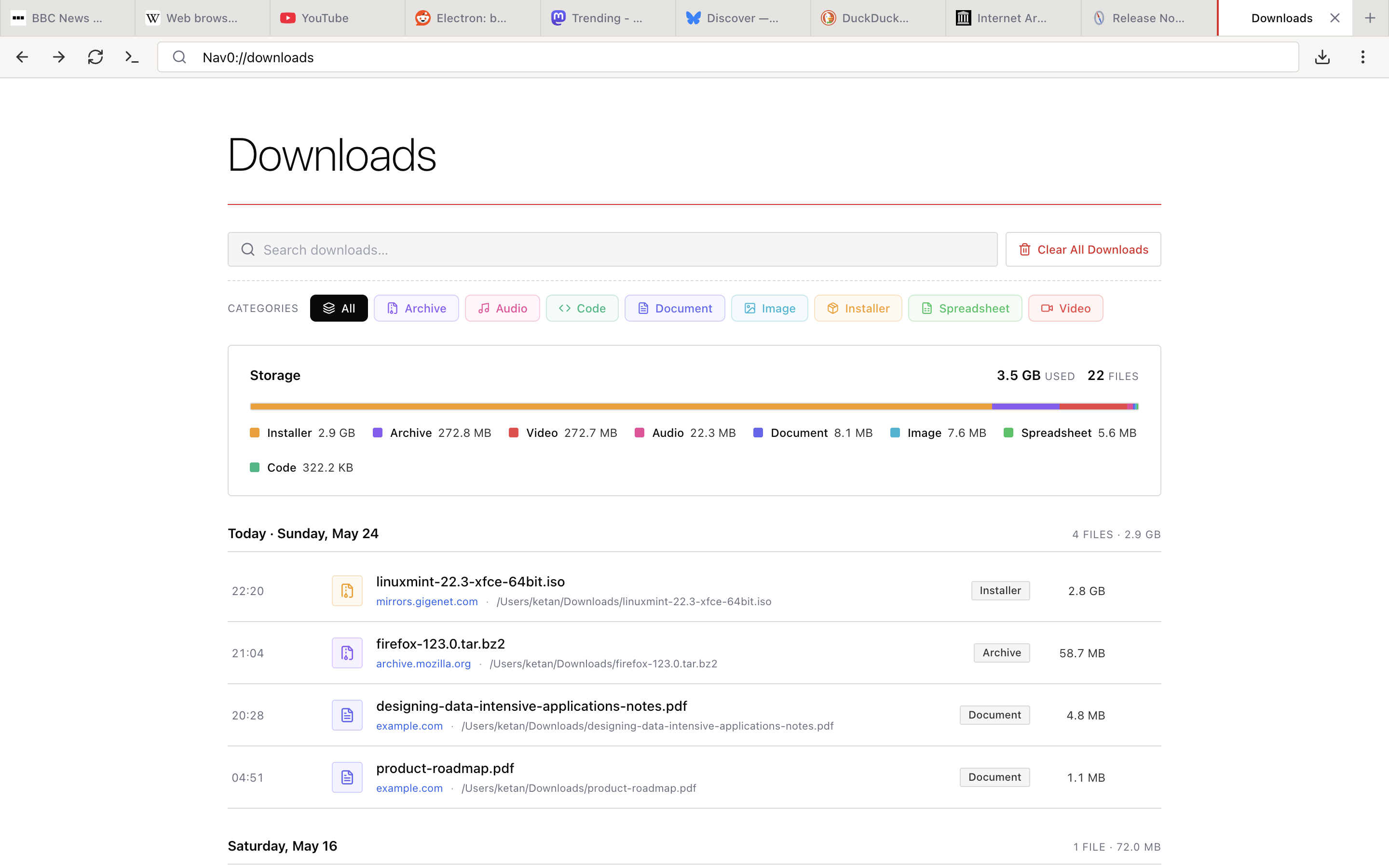
The Downloads page at nav0://downloads is more than a list — it groups your downloads by file type and surfaces a storage breakdown so you can see where disk space is going.
- Category filters — All, Archive, Audio, Code, Document, Image, Installer, Spreadsheet, Video
- Storage chart with per-category usage ("Installer 2.9 GB", "Archive 272.8 MB", …) and total used/file count
- Chronological grouping by day with file count and total size per day
- Per-file metadata — source host, full local path, category badge, file size
- Pause, resume, and cancel active downloads
- Cross-session resume — paused downloads survive a browser restart
- Circular progress indicator in the navbar download icon
- In-tab progress bar with click-to-open when complete
- Search across filenames, hosts, and paths
- Clear All Downloads to wipe the list (the files themselves stay on disk)
- No upload scanning — Nav0 does not send your downloads to any external scanning service
Browsing & Reading
Find in Page
Search any page with Ctrl+F / Cmd+F. The find bar supports case-sensitive matching, regex, and whole-word matching, with a live match counter and previous/next navigation.
Reader Mode
Distraction-free reading powered by Readability.js. Strips navigation, sidebars, ads, share buttons, and related-article rails to leave just the article body and a clean reading column. Toggle from the address bar.
PDF Reader
Open PDFs inline in browser tabs — no separate viewer, no download-then-open workflow. Also reachable via File → Open PDF (Ctrl+Shift+O). Standard zoom, page navigation, and text selection all work as expected.
Print Page
Print from the File menu, the page Options menu, or the right-click context menu. Uses the OS's native print dialog.
Hard Reload
Cmd+Shift+R clears the current site's cache and performs a fresh reload — useful when a site is stuck on a stale asset.
Browser Notifications
Desktop notifications with per-site permission control, routed through your OS's notification centre. No external notification services involved.
External Protocol Links
Handles mailto:, tel:, and other external protocol links (Slack, Zoom, Discord, etc.) by opening them in the registered handler on your system, with a confirmation prompt before launching.
Web Share API
Native share support for web pages that call navigator.share. The share sheet uses your OS's native share UI.
Privacy Features
Ad Blocker
Ad blocking is built-in, not an extension. Read the full Ad Blocker guide →
- Domain blocking and URL pattern matching for network-level requests
- Cosmetic filtering to hide leftover ad slots after network-level blocking
- Video ad blocking with an IMA SDK mock and early script injection so YouTube-style ads are blocked before the player initializes
- Four built-in filter lists ship pre-installed: EasyList, EasyPrivacy, Peter Lowe's Ad Server List, and Fanboy's Annoyances
- Per-site whitelist — turn off ad blocking for a specific site (e.g. a site you support directly) without disabling it globally
- Streaming compatibility — pre-configured exceptions for YouTube, Netflix, Spotify, and other streaming services so player UI never breaks
Tracking Protection
Built-in protection against common trackers. Read the full Privacy & Tracking Protection guide →
- Block third-party cookies by default, with two looser modes available for sites that need them
- Three cookie modes: block all third-party (recommended default), block with per-domain exceptions, or allow all
- Clear cookies on close as an opt-in
- Fingerprinting protection to reduce the entropy sites can derive from your browser
- Referrer trimming so cross-origin requests do not leak the exact page that linked to them
- No tracking of your tracking protection usage — Nav0 does not report which sites you blocked or whitelisted
Popup Blocking
Per-site popup controls with safeguards against the worst patterns:
- Smart-allow policy — clicks within a 60-second window after a user gesture can trigger a popup; everything else is blocked
- Popup flood protection — prevents sites from opening a runaway chain of popups even if the first one was allowed
Private Browsing
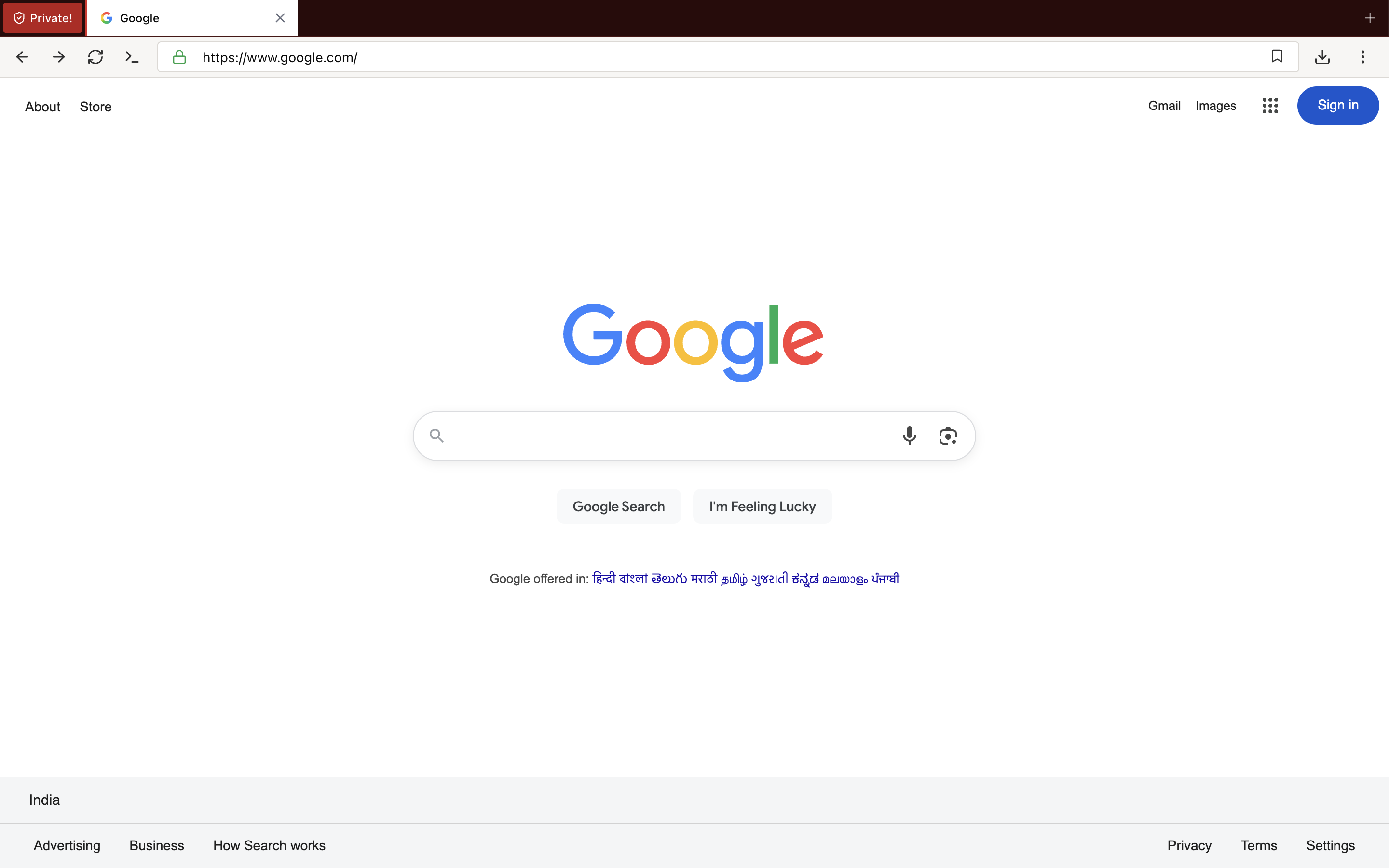
Private windows have a persistent Private! chip in the tab strip so you always know which window is incognito. The chip is red and unmissable; you never have to guess which window is the private one. Read the full Private Browsing guide →
- No history saved — nothing from a private window is written to the history database
- Cookies cleared on close — the entire cookie store for the private window is wiped when the last private tab closes
- No cached data persists — disk cache is bypassed
- Search suggestions forced off in private mode so keystrokes are not sent to the search engine
- Persistent private-window indicator — the red Private! chip stays visible the whole time the window is open
- Truly private — we can't see it either; there is no telemetry from any window, private or not
HTTPS Enforcement
Automatic security upgrades for everything you type:
- HTTP URLs are automatically upgraded to HTTPS where possible
- Clear warnings for sites that fail the upgrade
- No phoning home to check URLs against a remote safe-browsing database
Customizable User Agent
Mask your browser identity from sites that change behaviour based on UA string. See all presets →
- Eight presets: Chrome, Safari, Firefox, and Edge across macOS and Windows
- Custom UA string option for everything else
- Changes apply to all open tabs immediately — no restart required
Security Features
SSL Certificate Indicator
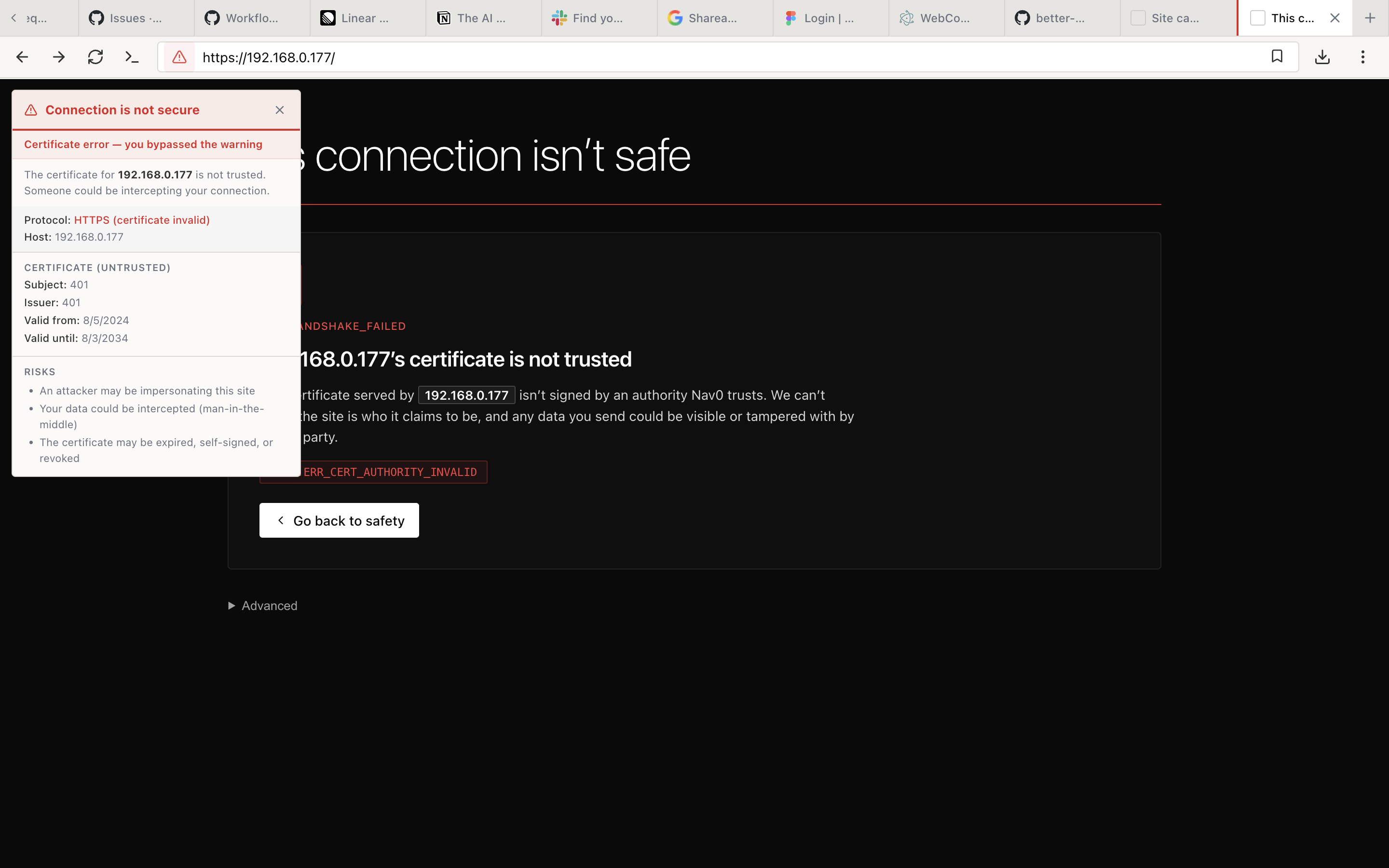
Click the lock icon in the address bar to open an overlay with the full certificate details for the current site. The overlay surfaces information that other browsers bury three menus deep:
- Protocol (e.g. "HTTPS (certificate invalid)")
- Host the certificate was served for
- Subject and Issuer, with a clear "(untrusted)" badge when the chain does not validate
- Valid from / Valid until dates
- Risks section — plain-language explanations of what could go wrong if you proceed (impersonation, MITM, expired/self-signed cert)
- Closes on click-outside or Escape
SSL/Security Warning Page
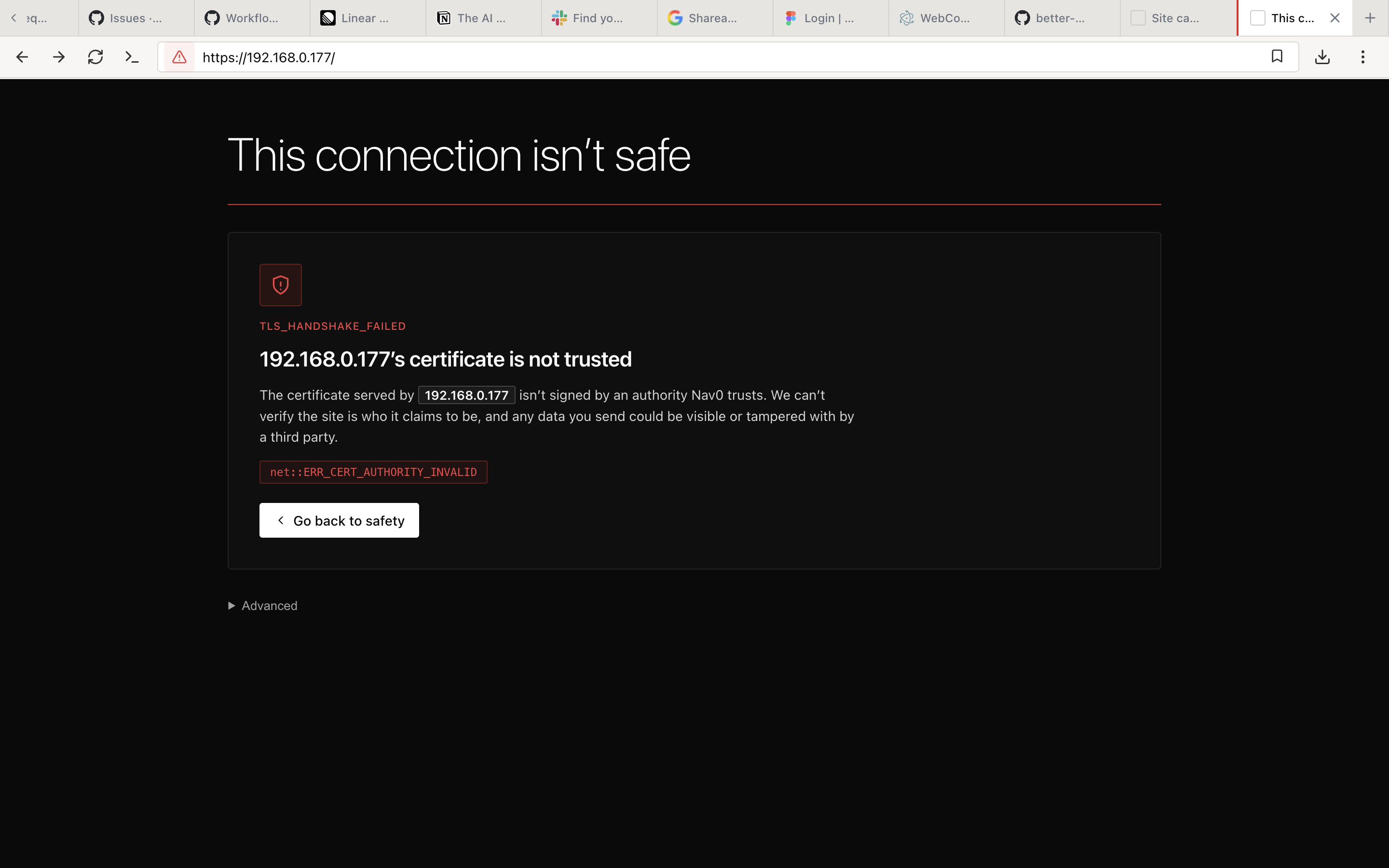
When a site fails certificate validation, Nav0 serves a full-page warning instead of letting you click through silently. The page names the exact failure (e.g. TLS_HANDSHAKE_FAILED, net::ERR_CERT_AUTHORITY_INVALID), explains what it means in one sentence, identifies the host, and offers a single clear escape: Go back to safety. The "Advanced" link to bypass is collapsed by default, and a bypass only lasts 24 hours before the warning returns.
Custom Error & Offline Pages
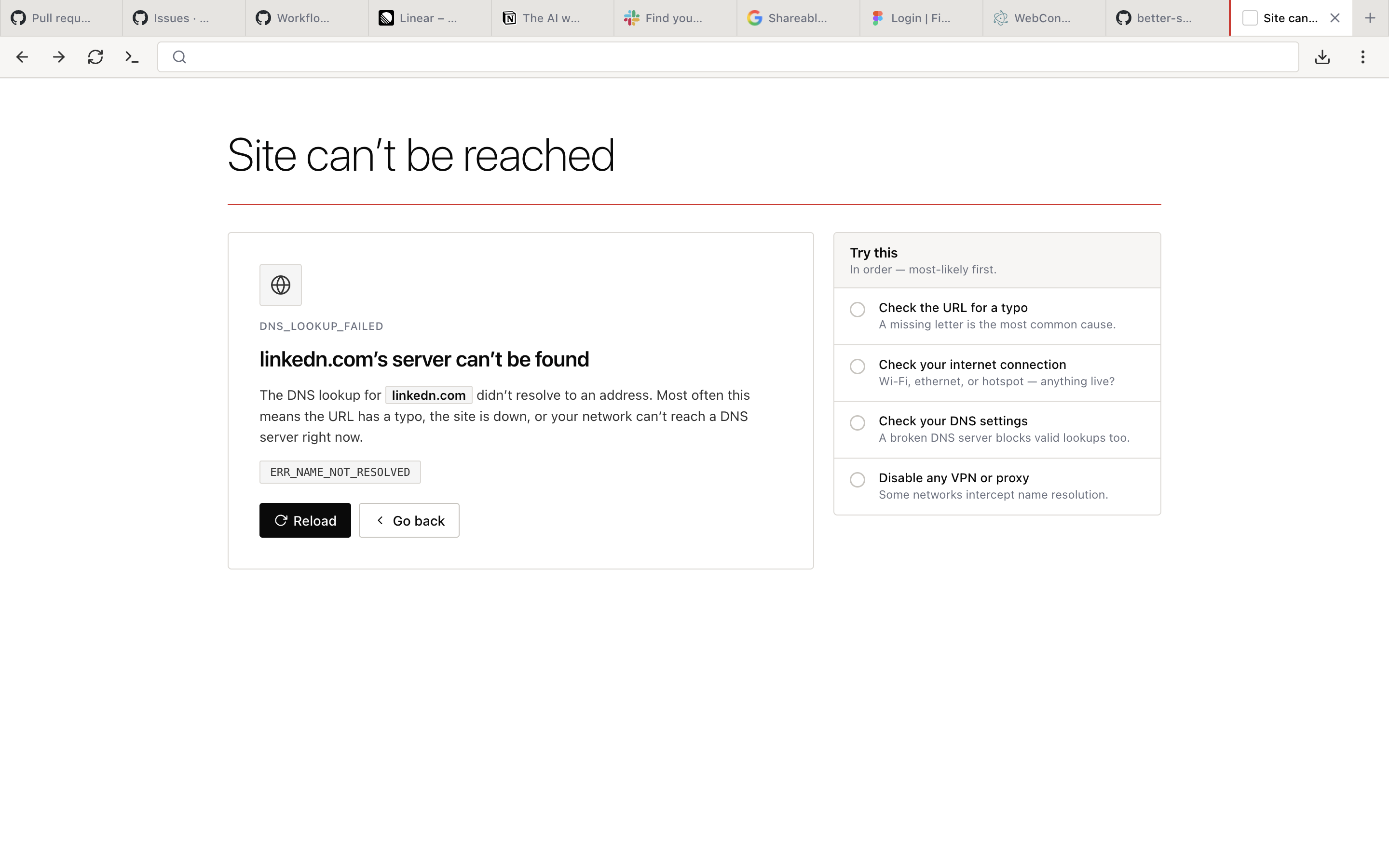
Friendly, scannable error pages replace cryptic browser strings. Each page identifies the failure mode, explains it in one sentence, shows the diagnostic code, and offers an ordered "Try this" checklist of likely causes.
- Friendly error page when navigation fails (DNS lookup failed, connection refused, TLS error, etc.)
- Dedicated offline page when there is no internet connection at all
- Plain-language explanations with the underlying diagnostic code visible (e.g.
DNS_LOOKUP_FAILED,ERR_NAME_NOT_RESOLVED) - Ordered "Try this" checklist on every error page — "Check the URL for a typo" first, then "Check your internet connection", then DNS, then proxy
- Reload and Go back as the only two primary actions
Safe Browsing
Protection without surveillance:
- Local blocklists for known malicious sites — shipped with the browser, updated via standard release channels
- Warning pages for suspicious downloads
- No URL checking against remote servers — Nav0 never sends the URLs you visit to a remote safe-browsing service
- No phone-home for safe-browsing list updates beyond the normal release channel
Sandboxing
Standard Chromium security model:
- Process isolation per tab
- Restricted file system access from web content
- Memory protection between processes
Regular Updates
- Security patches pulled from upstream Chromium
- Transparent changelog — every release note is visible at /releases
- No forced updates — you control when to install
Browser Settings & Permissions
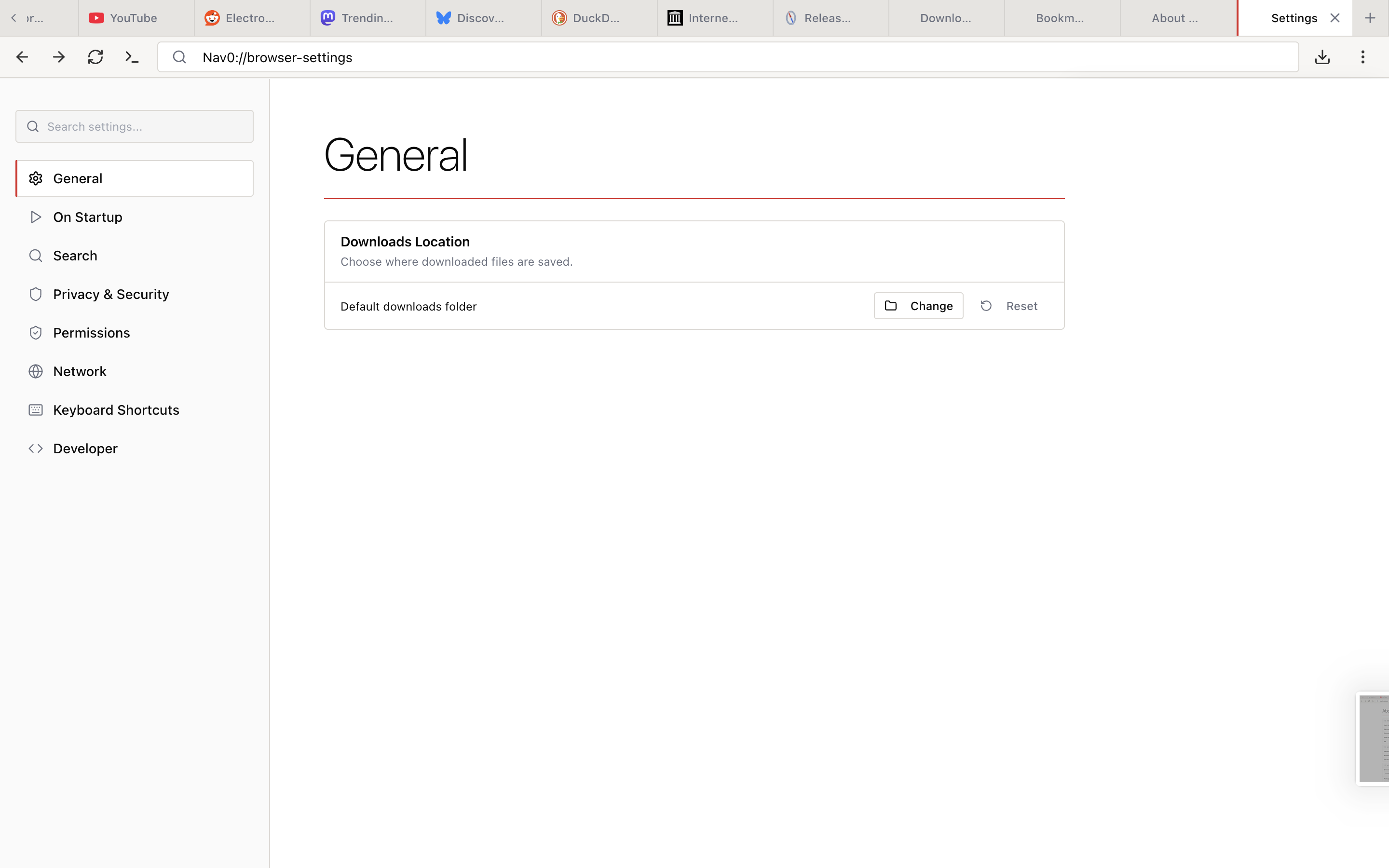
Open settings via the Options menu or by navigating directly to nav0://browser-settings. The settings UI has eight focused sections, each enforced by the browser itself — there is no cloud profile that can override your local preferences.
General
Choose where downloaded files are saved. One-click reset to the OS default downloads folder.
On Startup
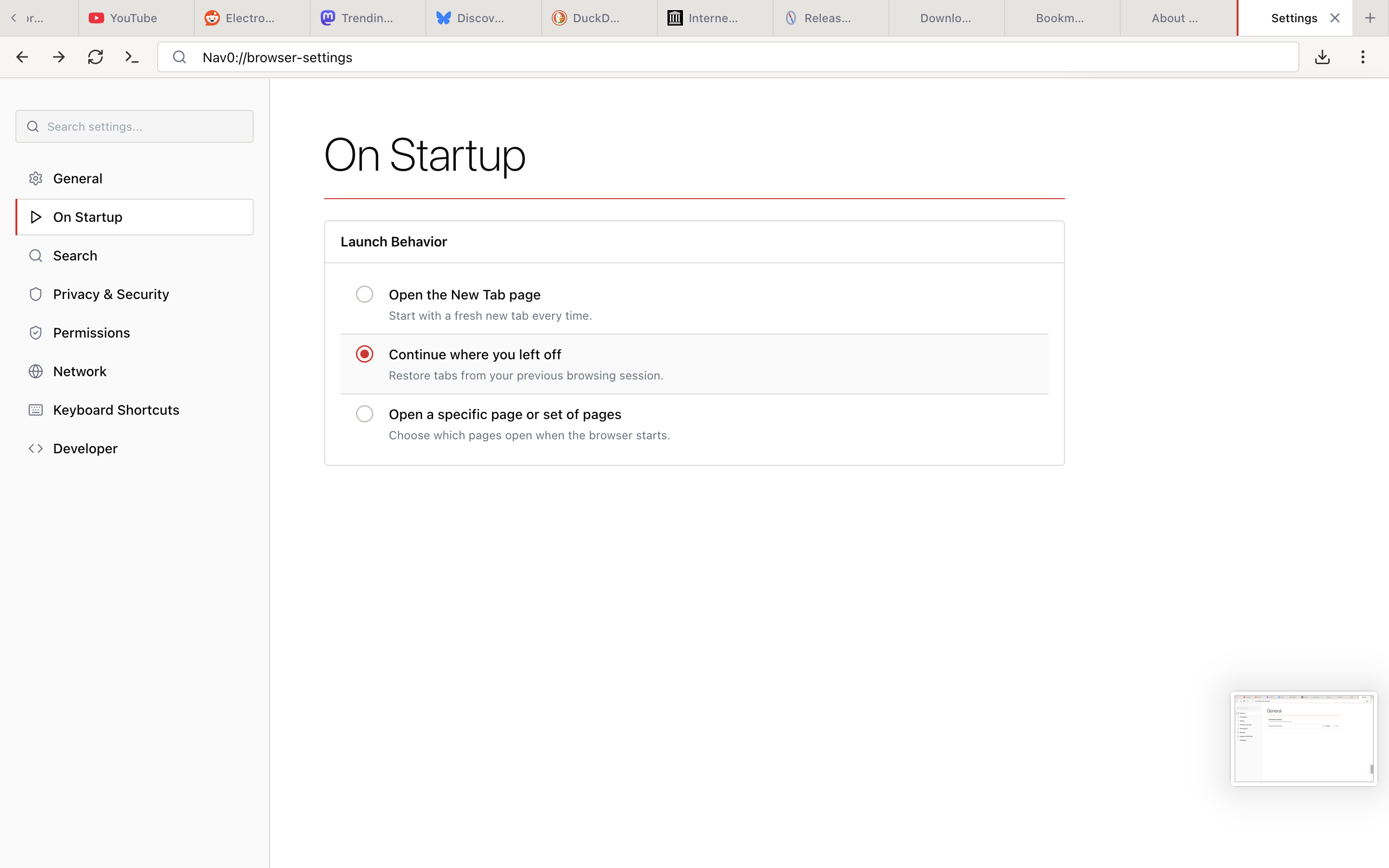
Pick what happens when Nav0 launches:
- Open the New Tab page — start with a fresh new tab every time
- Continue where you left off — restore the previous session's windows and tabs
- Open a specific page or set of pages — boot straight into the sites you always need
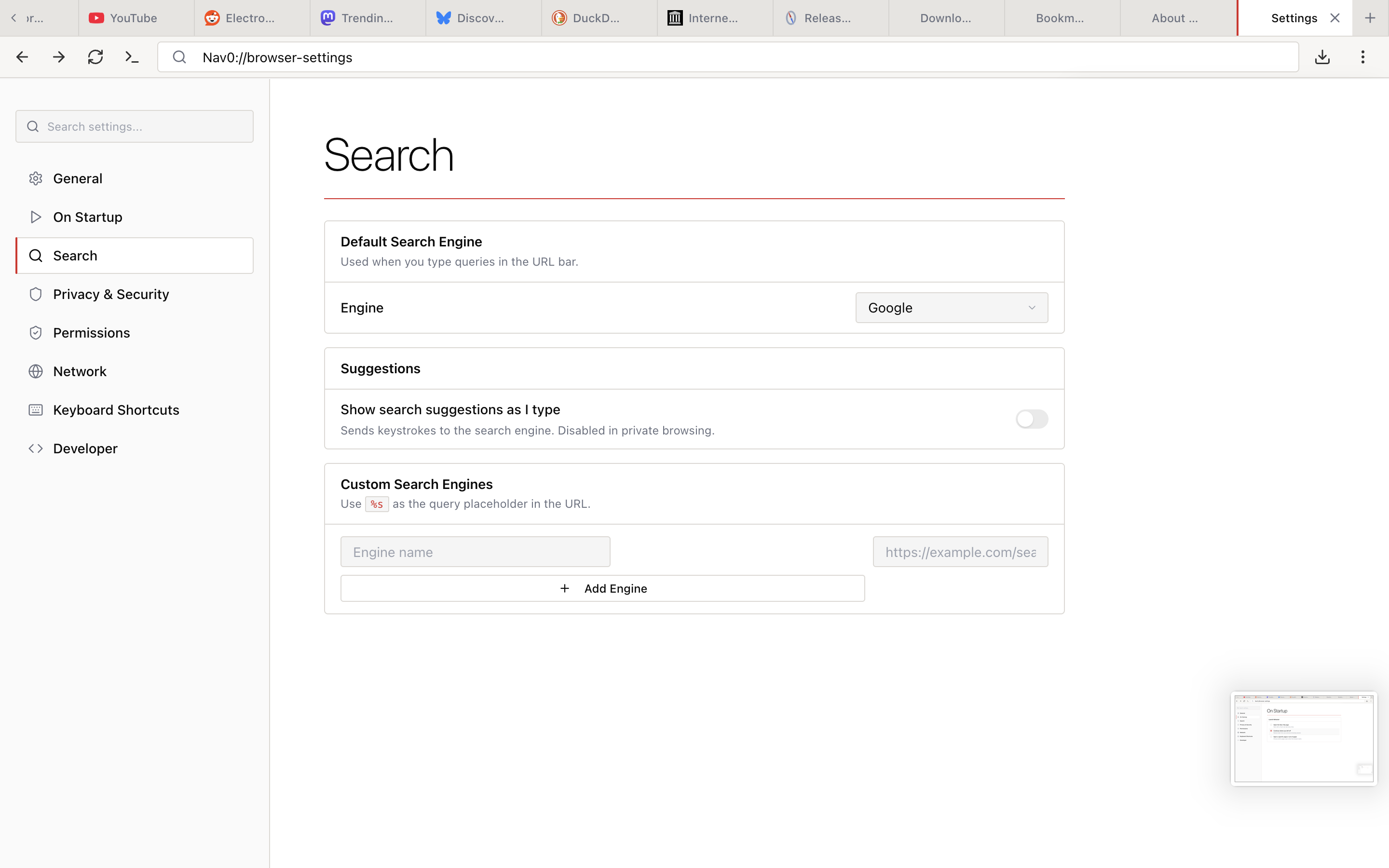
Search
Configure how the address bar handles queries.
- Default search engine — six built-in options (Google, DuckDuckGo, Bing, Brave Search, Startpage, Ecosia)
- Show search suggestions as I type — off by default, and forced off in private browsing, so keystrokes are not sent to the search engine unless you opt in
- Custom search engines — add your own by name and URL using
%sas the query placeholder
Privacy & Security
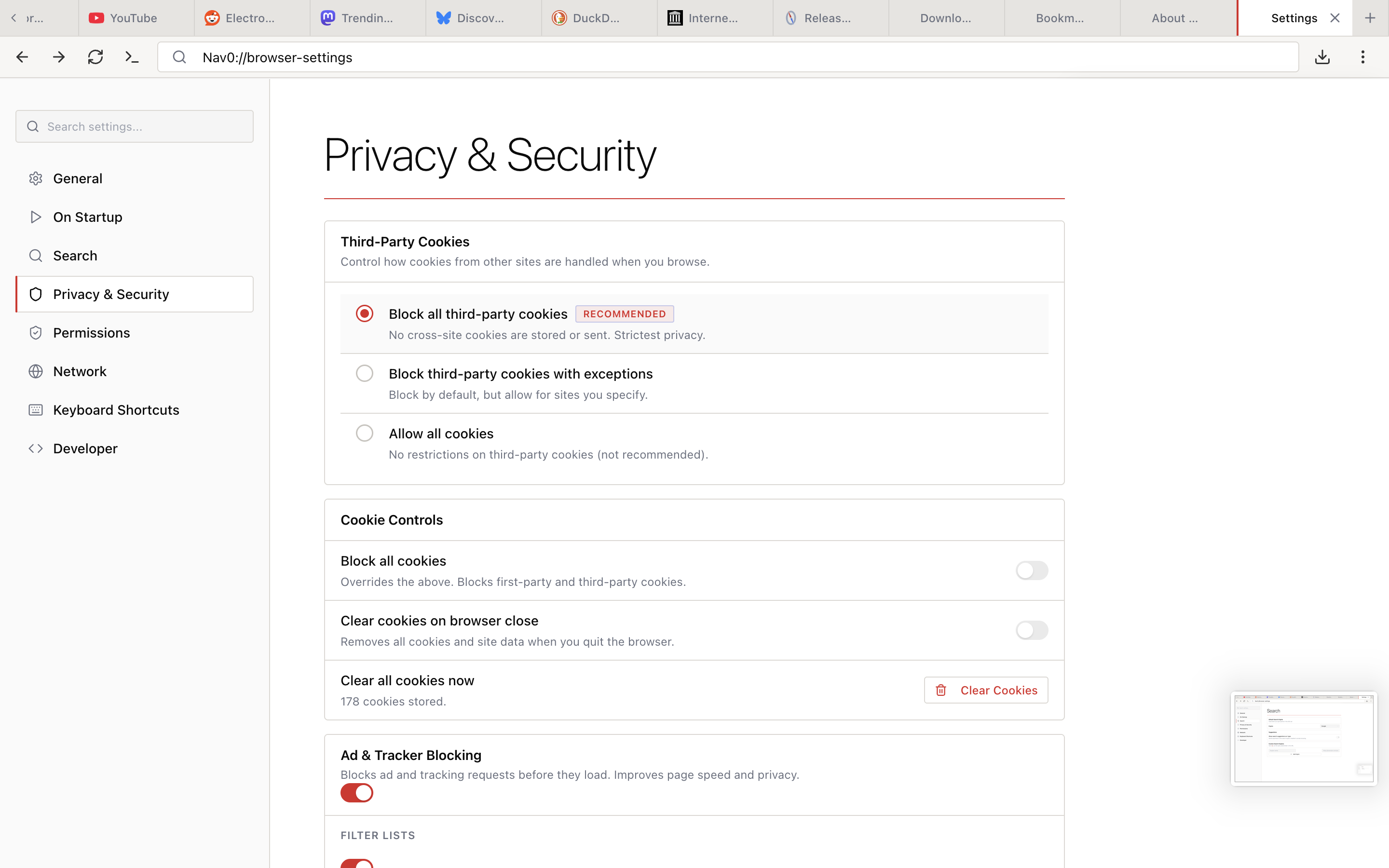
The largest settings page, because privacy is the product. It is organized into clearly labelled groups: Third-Party Cookies, Cookie Controls, Ad & Tracker Blocking, and Filter Lists.
- Third-party cookies: Block all (Recommended), Block with exceptions, or Allow all
- Cookie controls: Block all cookies (overrides the above), Clear cookies on browser close, and a one-click Clear all cookies now with a live "N cookies stored" counter
- Ad & Tracker Blocking master toggle (on by default), with a Filter Lists subsection
- Every option explains its trade-off inline — no jargon-only labels
Permissions
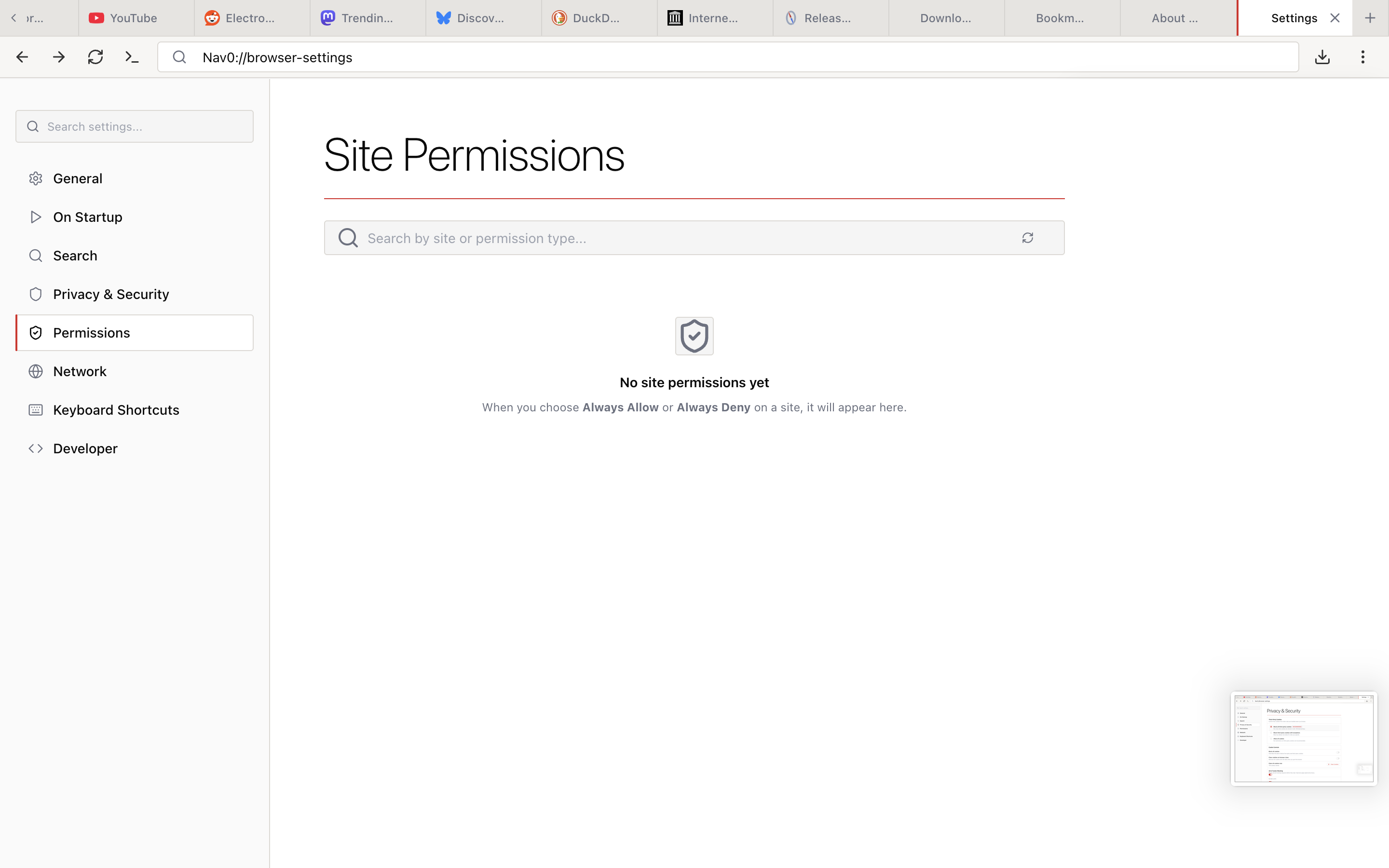
Per-site permission management for camera, microphone, location, notifications, and more. Searchable by site or permission type. When you have not made any allow/deny decisions yet, the page shows clear empty-state guidance instead of a blank list.
- Granular per-site allow/deny for every permission Chromium supports
- Flood protection — blocks rapid permission spam from sites that ask repeatedly
- Sensitive permissions blocked on insecure (HTTP) connections — no camera or location prompts over plain HTTP
- Private-browsing indicators on every permission prompt so you know which context the request is for
Network
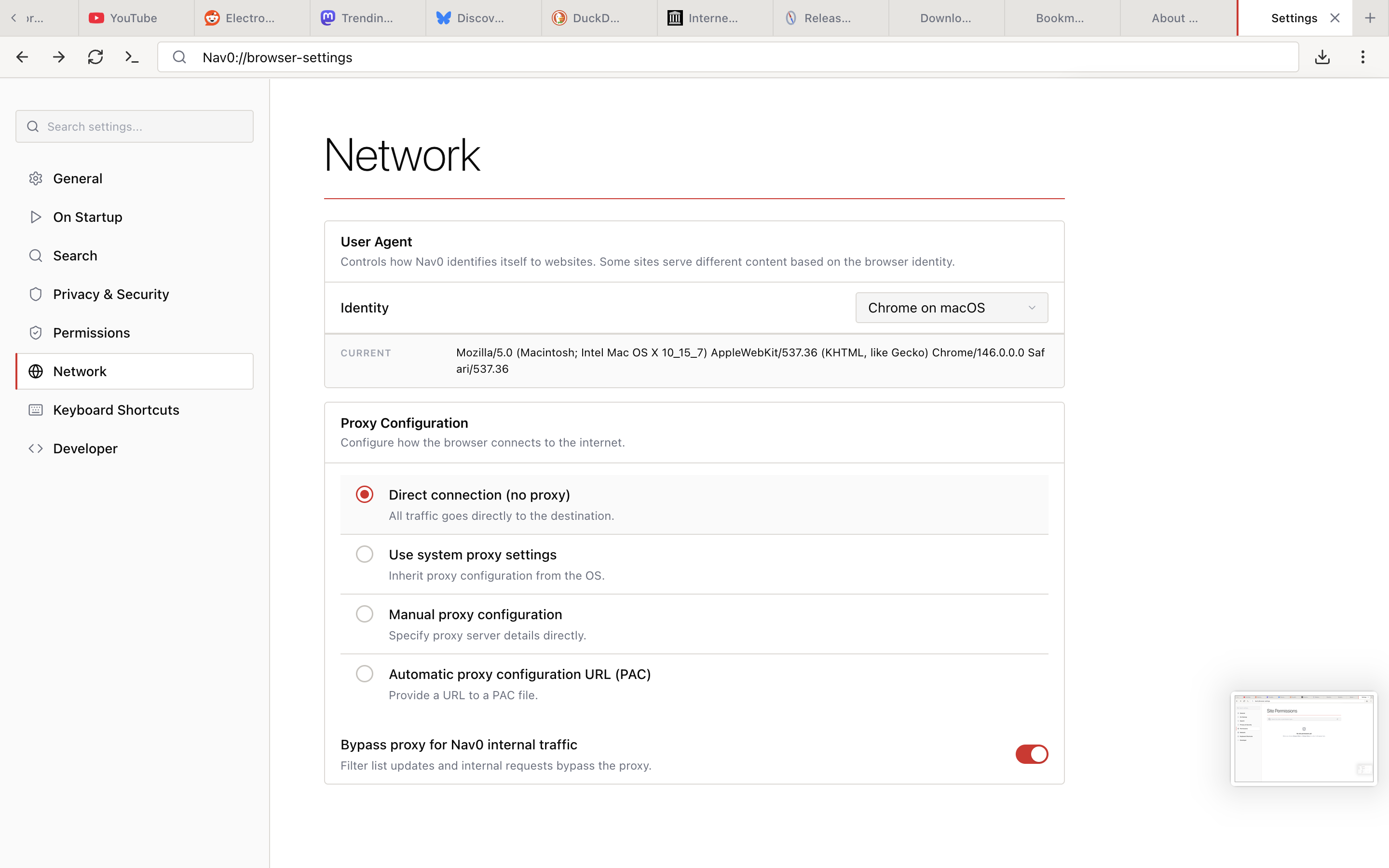
Identity and connectivity settings in one place.
- User Agent — pick from Chrome / Safari / Firefox / Edge presets across macOS and Windows, or supply a custom string; the current effective UA is displayed in full
- Proxy Configuration — Direct connection, Use system proxy settings, Manual proxy configuration, or Automatic (PAC) URL
- Bypass proxy for Nav0 internal traffic — filter list updates and
nav0://requests skip the proxy by default
Keyboard Shortcuts
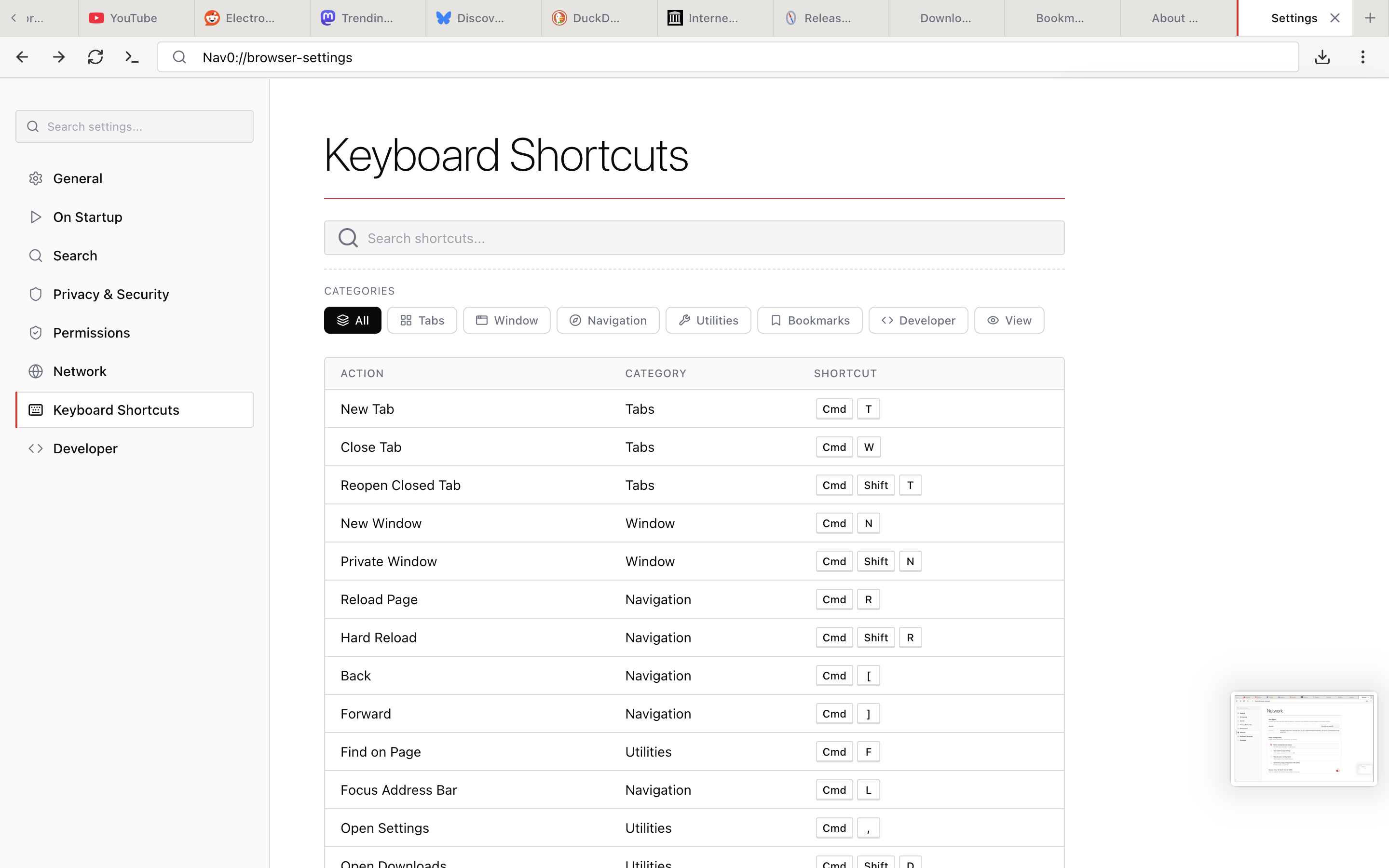
Every keyboard shortcut in the browser is listed and remappable. Full shortcut reference →
Developer
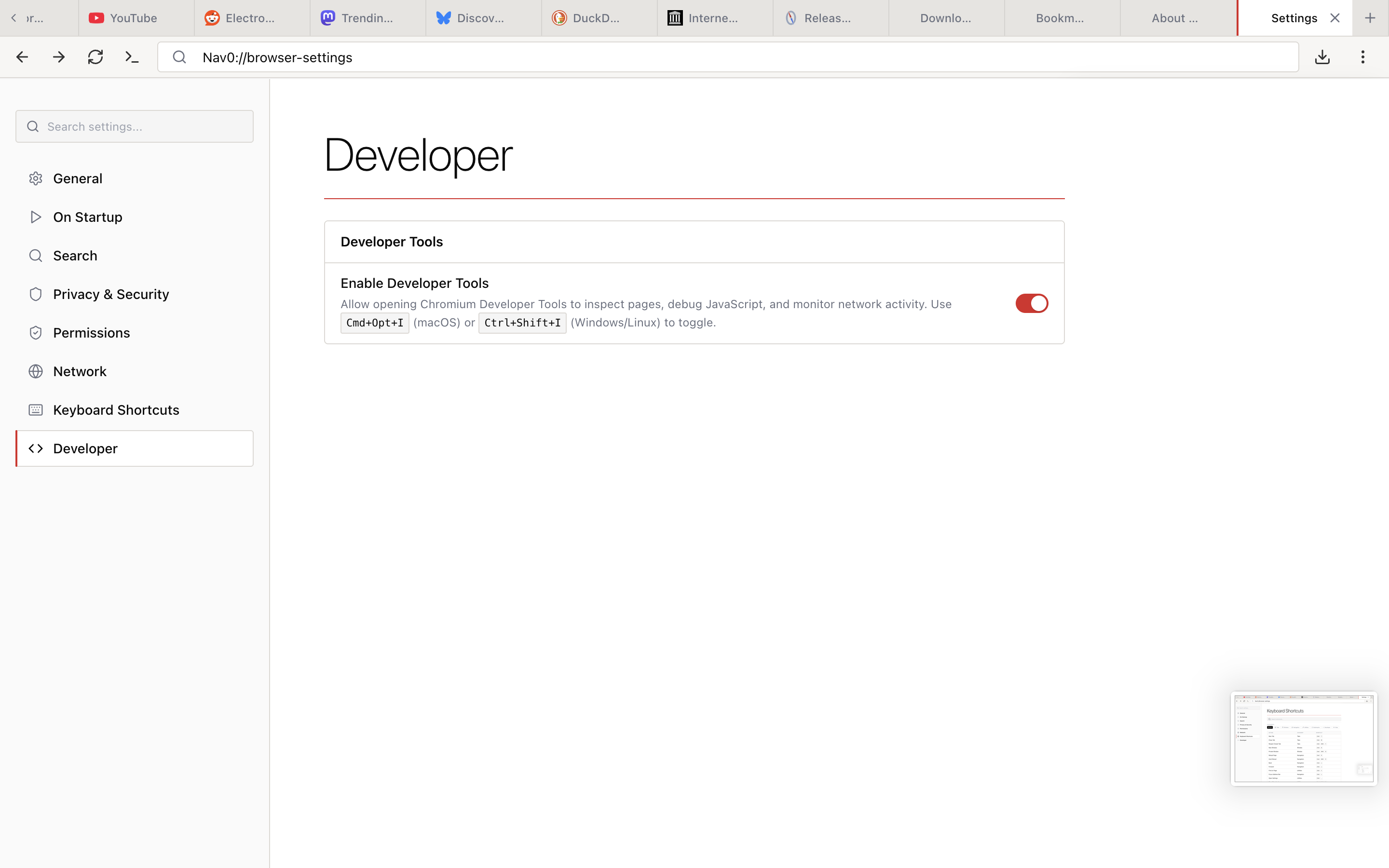
A single toggle to enable or disable Chromium's Developer Tools. Off by default for users who do not need them; one click away when you do. With it on, Cmd+Opt+I (macOS) or Ctrl+Shift+I (Windows/Linux) opens DevTools.
Geolocation
IP-based geolocation fallback for Linux — Nav0 does not depend on Google's location services to answer navigator.geolocation requests.
Network & Proxy
Proxy Configuration
Full proxy support, configured under Settings → Network. See details →
- Direct connection, system proxy, manual configuration, or PAC URL
- HTTP, HTTPS, SOCKS4, and SOCKS5 proxy protocols
- Configurable bypass rules for local addresses
- Bypass toggle for Nav0's own internal traffic (filter list updates,
nav0://requests)
Data Retention & Auto-Delete
Control how long anything is kept. See details →
- Configurable retention periods for history, downloads, cookies, cache, and autofill
- Auto-delete scheduler runs in the background — set it once, never think about it again
- Clear-on-close options for history, cookies, and cache
- Manual clear by time range: last hour, 24 hours, 7 days, 30 days, or all time
In-App Issue Reporting
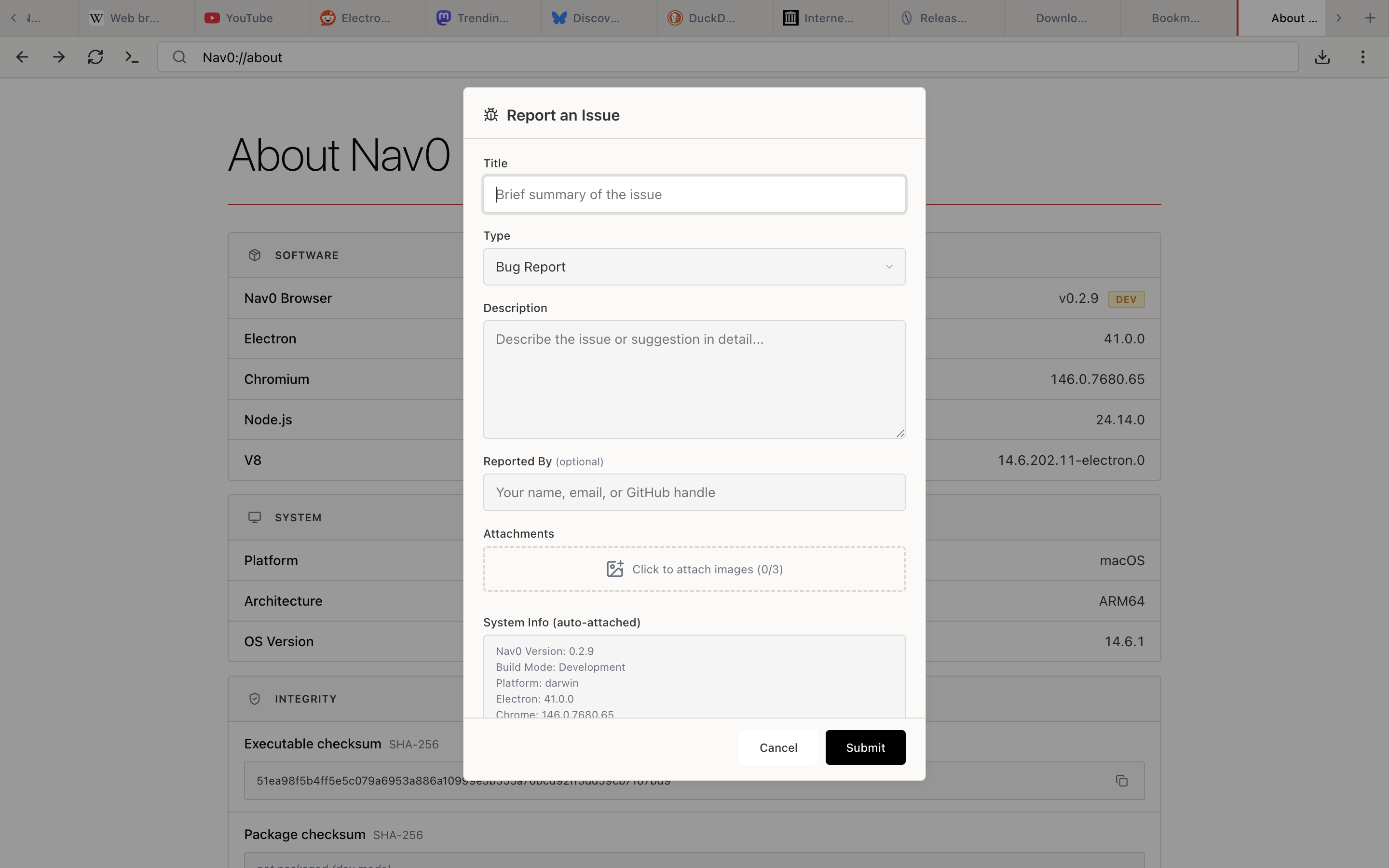
You can file a bug or feature request without leaving the browser. Open Report an Issue from the Options menu to get a dialog with everything pre-filled.
- Title and Description for the report
- Type picker — Bug Report, Feature Request, or similar
- Reported By — optional; anonymous reports are accepted
- Attachments — up to 3 images per report, resized and compressed client-side before upload
- System Info (auto-attached) — Nav0 version, build mode, platform, Electron version, and Chromium version are appended automatically so you do not have to copy them by hand
About Page
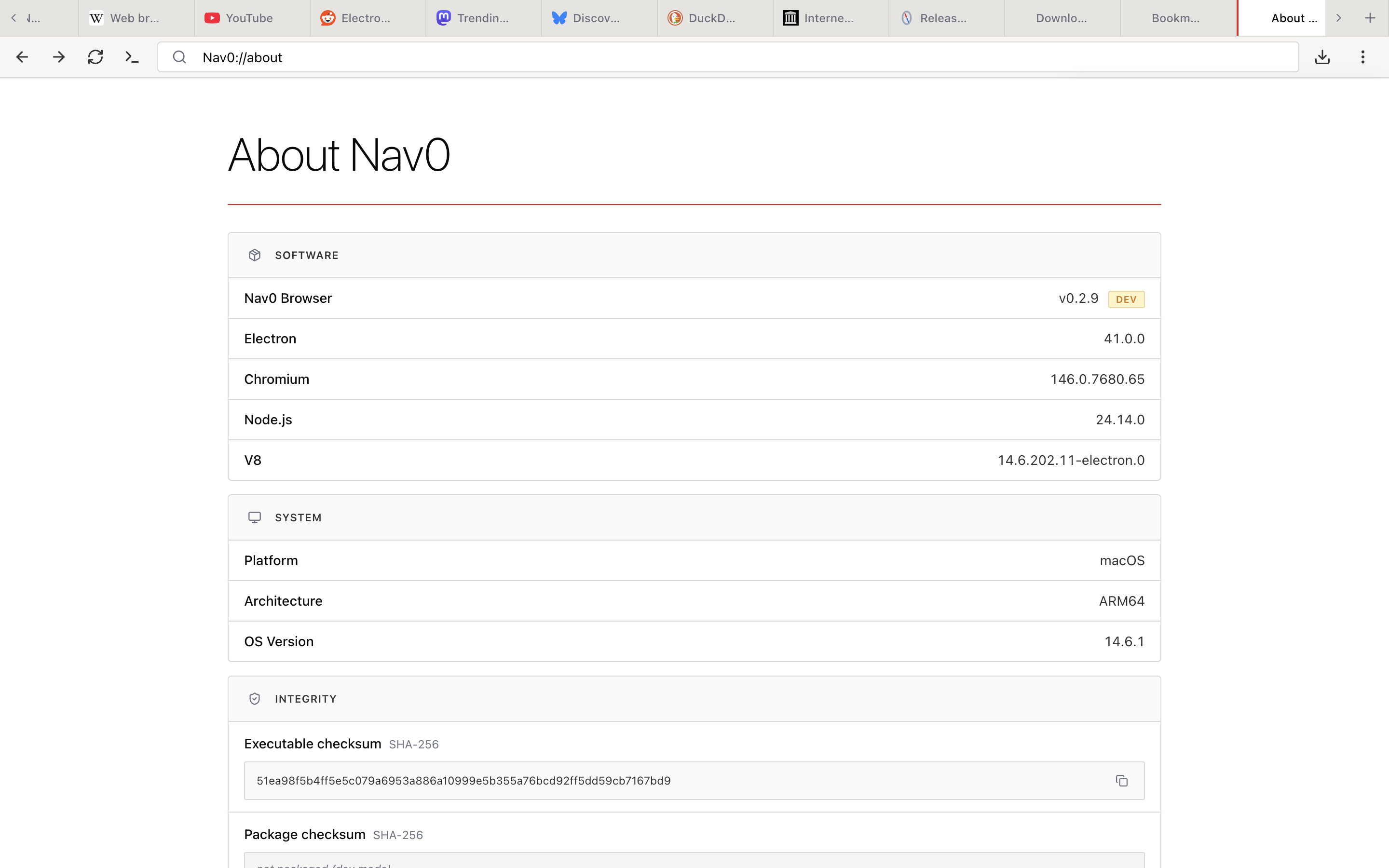
nav0://about shows exactly what is running on your machine — useful for filing bugs, verifying integrity, or just confirming you are on the version you think you are on.
- Software: Nav0 Browser version (with a Dev badge if it is a development build), Electron, Chromium, Node.js, and V8 versions
- System: platform, architecture, and OS version
- Integrity: SHA-256 checksums for both the executable and the package, so you can compare against a published release to confirm the binary has not been tampered with
What's Intentionally Missing
We deliberately exclude:
| Feature | Why It's Missing |
|---|---|
| AI Assistant | Unnecessary complexity, often cloud-dependent |
| News Feed | Distraction, usually ad-driven |
| Sync Service | Requires accounts, cloud storage |
| Rewards/Crypto | Not a browser's job |
| Built-in VPN | Usually upsells, trust issues |
| Reading List | Use bookmarks |
| Collections | Use bookmark folders |
Customization
Settings You Control
- Default search engine (6 built-in: Google, DuckDuckGo, Bing, Brave Search, Startpage, Ecosia — or add your own)
- Keyboard shortcuts (22 remappable shortcuts)
- Proxy configuration
- Data retention periods and auto-delete schedules
- Cookie policy
- User agent string
- Download location
- Start page
Settings We Don't Include
- Telemetry opt-out (there's nothing to opt out of)
- Data sharing preferences (we don't share data)
- Personalization options (nothing is personalized)
Performance
Tab Hibernation
Tabs untouched for 72+ hours are automatically suspended, freeing memory while preserving your session. Suspended tabs reload on demand the next time you click them — no manual unloading needed.
Lightweight by Design
- No pre-loading of suggested content
- No idle network requests or background sync
- No account checks or news feeds on startup
- Fast cold start — just the browser, ready to go
Developer Features
For web developers:
- Full Chromium DevTools (opt in under Settings → Developer)
- Console, Network, Elements, Sources, Application, and Performance panels
- Local storage and IndexedDB inspection
- No additional "developer clouds" or services