
Comparisons
The Enshittification of Chrome: How the World's Most Popular Browser Turned Against Its Users
 Ketan Patil15 min readKetan Patil15 min read
By Ketan Patil · February 28, 2026 · 9 min read
Look, I'm just gonna say it. Chrome is cooked.
I remember downloading Chrome for the first time back in 2008. It was genuinely exciting. Internet Explorer was a dumpster fire, Firefox was getting sluggish, and then Google dropped this sleek, minimal browser that just flew. No toolbars, no clutter, no nonsense. It did one thing and it did it really well: browse the web fast.
Fast forward to 2026 and Chrome has become the very thing it was supposed to replace. It's bloated, it's slow, it eats your RAM for breakfast, and it's constantly trying to shove Google's services down your throat. What happened? Well, there's actually a word for it now. Enshittification.
The term was coined by writer Cory Doctorow and it describes a pretty specific pattern that platforms follow. It goes something like this:
Sound familar? Yeah. That's Chrome's whole arc in a nutshell.
When Chrome launched, it was legitimately revolutionary. The V8 JavaScript engine was blazing fast. Each tab ran in its own process so one bad website wouldn't crash your whole browser. The interface was clean — just a URL bar and your tabs. That was basically it.
Google was playing the long game here. They needed people on the web because more web usage meant more Google searches, which meant more ad revenue. So they invested heavily in making the web experience better for everyone. Chrome wasn't the product. The web itself was the product, and Chrome was just the tool to get you there.
And honestly? It worked great. Chrome went from 0 to 60% market share in just a few years. Developers loved it. Users loved it. Even the tech press couldn't stop gushing about it. Those were the good times.
Here's where things started getting kinda sus.
Once Chrome had dominant market share, Google started making moves that benefited Google first and users... well, eventually. Maybe. If at all.
In 2018, Chrome started automatically signing you into the browser whenever you signed into any Google service. Check your Gmail? Boom, you're now signed into Chrome too. Google initially claimed this didn't affect data sync, but come on. The whole point was to tie your browsing identity to your Google account.
After massive backlash they walked it back a tiny bit, but the damage was done. The default experience was now designed to get you logged in and keep you logged in.
Remember when Chrome was the lightweight browser? Those days are long gone my friend. Chrome started eating RAM like it was going out of style. Five tabs open? That'll be 1.5 gigs of memory, please. Oh, you've got 20 tabs? Better hope you have 8GB of RAM because Chrome wants most of it.
Every update seemed to add more background processes, more pre-rendering, more "smart" features that required your computer's resources. People started making memes about Chrome eating RAM, which is funny until you realise your laptop battery dies in 3 hours because Chrome is running 47 background processes.
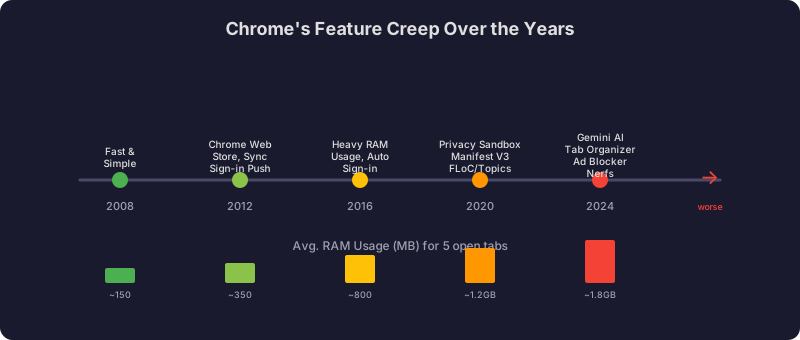
This one really ticked people off. Google announced Manifest V3, a new extension framework that fundamentally changed how browser extensions work. The official story? Better security and performance. The real story? Manifest V3 severely limits the ability of ad blockers to function properly.
What a coincidence that the world's largest advertising company decided to cripple the tools people use to block ads. Totally unrelated to their core business model, I'm sure.
uBlock Origin, probably the most popular ad blocker on the planet, had to be completely rewritten. And even the rewritten version (uBlock Origin Lite) is less effective than the original because of the artificial limitations Google baked into the new API. Raymond Hill, the developer behind uBlock Origin, didn't mince words about why this was happening.
This is where we're at now, and honestly its pretty grim.
Google started cramming Gemini AI into Chrome like they were getting paid per feature. And I mean, they literally are — every AI interaction is another data point for Google's models. You've got AI-powered tab organizer, AI writing assistant, AI search summaries that replace actual website visits (great for publishers, right?), and "Help me write" features that read whatever you're looking at.
Nobody asked for any of this. We wrote a whole piece on why AI doesn't belong in your browser. Poll after poll shows users want their browser to be fast, reliable, and stay out of the way. Instead we got a browser that wants to be your AI assistant, your shopping buddy, and your writing tutor all at once.
When Google announced they were killing third-party cookies, everyone thought it was a privacy win. Turns out they were just replacing one tracking system with a different one that Google controls exclusively.
The Topics API, Privacy Sandbox, and Protected Audiences are all systems where YOUR browser — running on YOUR computer — does the ad targeting work that third-party cookies used to do. Your browser literally categorizes your interests and shares them with advertisers. Google framed this as privacy-preserving, which is technically true in the narrowest possible sense. But the net effect is that tracking just moved from third-party cookies to a first-party system that Google controls end to end.
And then in mid-2024, Google straight up reversed course and said actually, they're keeping third-party cookies after all. Years of development. Years of the entire ad industry restructuring. All for nothing. You can't make this stuff up.
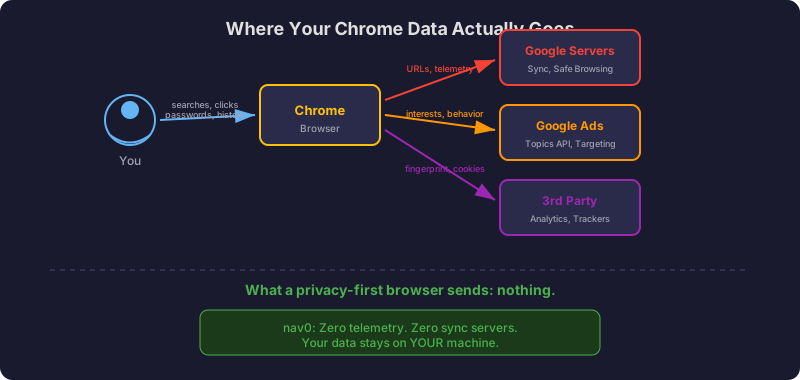
At this point Chrome is basically a telemetry machine that also happens to browse the web. We documented the full scope of how browsers watch you in a separate piece. Here's a non-exhaustive list of what Chrome phones home about:
So if Chrome is this bad, why does it still have like 65% market share? A few reasons:
Defaults are powerful. Chrome comes pre-installed on every Android phone. It's the default on Chromebooks. Google pays Apple billions to be the default search engine on Safari. Most people never change defualts.
Ecosystem lock-in. If you use Gmail, Google Drive, Google Calendar, and Google Photos, Chrome feels like the "obvious" choice. Everything's integrated. Your passwords are synced. Your bookmarks are there. Switching feels like a massive hassle even though it really isn't.
People don't know. Most regular users have no idea how much data Chrome collects. They don't know about Manifest V3 or the Topics API. They just know Chrome "works" and they've been using it for years. And honestly, that's not their fault. Google doesn't exactly advertise the downsides.
"I have nothing to hide." This one drives me nuts. Privacy isn't about hiding things. It's about not having a multi-trillion dollar corporation build a comprehensive profile of your entire digital life so they can sell more targeted ads. That shouldn't be a controversial position but here we are.
What happened to Chrome isn't unique. It follows the exact same playbook we've seen with Facebook, Twitter, Amazon, and basically every other major platform:
Chrome in 2026 is objectively worse for users then Chrome in 2012. It uses more resources, collects more data, restricts extensions more, and pushes more unwanted features. But it has ~65% market share so Google has zero incentive to change course.
The good news is you don't actually have to put up with this. There are browsers that haven't followed Chrome down the enshittification path.
But here's the thing — most "alternatives" are still built on Chromium, which is Google's open-source engine. The problem runs deeper than any single browser. Edge, Brave, Opera, Vivaldi... they all use Chromium under the hood. That means Google still controls the fundamental architecture. When Google decides to nerf extensions via Manifest V3, all those browsers have to deal with it too.
A real alternative needs to be:
Enshittification describes the pattern where Chrome started as a fast, minimal browser to attract users, then gradually degraded the experience to serve Google's advertising business. This has included adding bloat and AI features nobody asked for, restricting ad blockers via Manifest V3, and collecting extensive user data through systems like the Topics API and Privacy Sandbox — all while maintaining dominant market share through defaults and ecosystem lock-in.
Chrome runs each tab in its own process and has added numerous background processes over the years — pre-rendering, prediction services, AI features, and telemetry. What started as a lightweight browser now routinely uses 1.5 GB or more with just a few tabs open, draining battery life and system resources. Every update seems to add more background processes rather than fewer.
Manifest V3 is Google's new extension framework that severely limits the network request interception capabilities that ad blockers rely on. This forced uBlock Origin to be completely rewritten as uBlock Origin Lite, which is less effective than the original due to artificial limitations Google baked into the new API. Critics argue this directly benefits Google's core advertising business.
Chrome collects URLs you visit via Safe Browsing, search queries as you type them keystroke by keystroke, browsing interests via the Topics API, hardware identifiers that persist across sessions, usage patterns including when and how long you browse, and crash reports that can contain fragments of page content. This data feeds directly into Google's advertising targeting machine.
A genuine Chrome alternative should not be controlled by an advertising company, should be fully open source for transparency, should be minimal with zero bloat, and should collect absolutely zero telemetry — not "anonymized" telemetry, not "optional" telemetry, but none at all. Nav0 meets all of these criteria, with no sign-in, no accounts, no AI features, and no data collection of any kind.
This is exactly why Nav0 exists. We got tired of watching browsers get worse while pretending to get better.
Nav0 collects zero telemetry. Not reduced telemetry, not anonymized telemetry — literally zero. There are no analytics, no crash reports phoning home, no usage data being collected. Your browsing data stays on your machine and nowhere else.
There's no sign-in, no account, no sync service routing your data through our servers. There are no AI features mining your browsing for training data. No news feeds, no shopping assistants, no crypto wallets. Just a browser that browses the web.
It's fully open source so you don't have to trust us. Read the code. Audit it. Build it yourself if you want to. We think that's how it should be.
The browser you use shapes your entire experience of the internet. Maybe it's time to pick one that isn't actively working against you.
Try Nav0 — it's free, open source, and actually respects your privacy.
Nav0 is a minimal, open-source browser built on one principle: your browser should work for you, not for an ad company. Zero telemetry. Zero bloat. Zero BS. Learn more.