

Why Your Browser Wants You to Sign In
By Ketan Patil · February 21, 2026 · 7 min read
You've seen it a hundred times. You open Chrome, and there's that little avatar icon in the top right corner, quietly judging you for not signing in. You install Edge on a fresh Windows machine and before you've even loaded a single webpage, Microsoft is begging you to "complete your browser setup" by connecting a Microsoft account.
It feels like every browser nowadays really, really wants to know who you are. They'll dress it up as convience — sync your bookmarks! Access your passwords anywhere! Pick up where you left off on your phone! — but the real reason goes a lot deeper than making your life easier.
The Gentle Nudge That Never Stops
Let's talk about how aggressive this has gotten. Chrome doesn't just ask once. It puts a persistent prompt in the toolbar. It pops up suggestions when you save a password. It reminds you when you switch profiles. Google even changed Chrome's behavior back in 2018 so that signing into any Google service (Gmail, YouTube, whatever) would automatically sign you into the Chrome browser itself. People were lowkey furious about it, and Google had to partially walk it back, but the nudging never stopped.
Edge is arguably worse. On Windows, Edge will pre-populate itself with your Microsoft account credentials from the operating system. It'll suggest syncing before you've even decided if you want to use Edge as your main browser. The onboarding flow is designed so that clicking through quickly — the thing most people do — results in a fully signed-in, syncing browser. You have to actively resist to stay signed out.
Safari ties itself to your Apple ID, which most Mac and iPhone users already have. There's no separate "browser account" — it's your whole Apple identity. Your bookmarks, history, passwords, and even open tabs sync across devices through iCloud whether you conciously think about it or not.
Firefox, to its credit, makes signing in more optional. But even Mozilla has ramped up prompts for Firefox Accounts in recent years, pushing sync features more prominantly in the UI and during onboarding.
What Happens When You Sign In
Here's the thing that most people don't really think about. When you use a browser without signing in, your browsing data lives locally on your device. Your history, bookmarks, saved passwords, autofill data — all of it is just files on your hard drive. If you wipe the browser or the machine, it's gone. Nobody else has it.
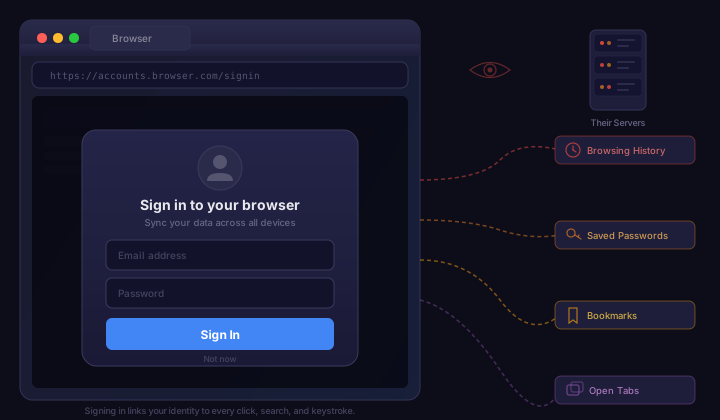
The moment you sign in, that changes completely. Your browsing data gets uploaded to the browser vendor's servers. And it's not just bookmarks. Depending on the browser and sync settings, the data that leaves your machine can include:
- Complete browsing history. Every URL you visit, timestamped and linked to your account.
- Saved passwords. Your credentials for every site, stored in the vendor's cloud.
- Autofill data. Names, addresses, phone numbers, credit card numbers.
- Open tabs. A real-time snapshot of what you're looking at right now, across all your devices.
- Extensions and settings. What tools you use and how you've configured your browser.
- Reading lists and bookmarks. A curated map of your interests over time.
Individually, each piece might seem harmless. Together, they form one of the most detailed profiles of a human being that any company could ask for. We documented the full scope of browser surveillance in a separate piece. Your passwords reveal what services you use. Your history shows what you read, what you research, what you shop for, what worries you at 2am. Your open tabs are basically a live feed of your attention.
And all of it is tied to your real identity — your email address, your phone number, your name. Not an anonymous device ID. Not a pseudonym. You.
The Business Model Behind the Button
So why do browser vendors want this data so bad? Because for most of them, it feeds directly into their core business.
Google is an advertising company. That's not an insult, it's literally how they make money. Big Tech controls most browsers precisely because of these incentives. Over 75% of Google's revenue comes from ads. Chrome isn't a product Google sells — it's a funnel that feeds their ad targeting machine. When you sign into Chrome, Google can connect your browsing behavior to the same identity they use for Gmail, YouTube, Search, Maps, and Android. The profile they build is insanely comprehensive. Your Chrome data makes their ads more precise, which makes advertisers pay more, which makes Google more money.
Microsoft has been leaning hard into the same playbook. Edge data feeds into Microsoft's advertising network, which powers ads on Bing, MSN, and across partner sites. Microsoft 365 integration means your browser behavior can be correlated with your work documents, emails, and calendar. Signing into Edge gives Microsoft a view into both your personal and professional life that would have been unthinkable ten years ago.
Apple is more nuanced. They genuinely do encrypt iCloud data in ways that limit their own access (and they've been expanding end-to-end encryption). But Apple still benefits from lock-in. Once your Safari data lives in iCloud, switching to a non-Apple browser or a non-Apple device means leaving your browsing life behind. Your data becomes a switching cost that keeps you in the Apple ecosystem buying Apple hardware.
The sign-in button isn't a feature. It's a business strategy.
Cross-Device Tracking Made Easy
Before browser sign-in was a thing, tracking users across devices was genuinely hard for data collectors. Cookies on your laptop didn't connect to cookies on your phone. Different IP addresses, different device fingerprints, different browsers — it was a fragmented picture.
Browser accounts solved that problem overnight. When you sign into Chrome on your laptop and your phone and your tablet, Google doesn't need to guess that these devices belong to the same person. You told them. Voluntarily. And then you gave them permission to merge all the browsing data from all those devices into one unified profile.
This is kind of a big deal that people gloss over. The entire ad-tech industry has spent billions trying to solve cross-device identity. Browser vendors just... asked nicely. And most people said yes, because they wanted their bookmarks on their phone.
Think about that for a second: the price of syncing your bookmarks is handing over a complete, cross-device, identity-linked record of everywhere you go on the internet.
Dark Patterns All the Way Down
The way browsers push sign-in is a textbook case of dark patterns — design choices that manipulate users into doing things they might not choose if the options were presented fairly.
Here's some of what we've seen:
- Pre-selected sync options. When you sign in, sync is usually turned on by default for everything. History, passwords, bookmarks, open tabs — all checked. Most users don't uncheck them. They don't even realize there's a checklist.
- Confusing opt-out flows. Trying to use Chrome without a Google account requires actively dismissing prompts and navigating settings that feel like they were designed to be confusing. The "Not now" button comes back. The "Sign in" button is always brighter and bigger than "Skip."
- Silent sign-in. As mentioned earlier, Chrome previously signed you into the browser automatically when you signed into a Google web service. This blurred the line between using a Google product and handing over your browsing data.
- Bundled accounts. Safari doesn't even give you a choice — if you use an Apple device, you probaly already have an Apple ID, and Safari will use it. Edge on Windows does the same thing with your Microsoft account.
- Loss aversion. "Your data isn't being backed up" warnings make you feel like you're being irresponsible by not signing in. The framing implies that not syncing is risky, when in reality, local-only data is the more private and often more secure option.
These aren't accidents. They're deliberate design decisions optimized through A/B testing to maximize sign-in rates. The goal is to make staying signed out feel like friction and signing in feel like the default, natural thing to do.
The Illusion of Encryption
Browser vendors know that privacy concerns could put people off signing in, so they lean heavily on encryption as a reassurance. "Your data is encrypted in transit and at rest," they'll tell you. And that's true — sort of.
Encryption in transit means nobody can intercept your data on the way to the server. Encryption at rest means the data is encrypted on the server's disk. But here's what they usually don't spell out: in most cases, the browser vendor holds the encryption keys. They can decrypt your data whenever they want or whenever a government asks them to.
Google's sync data, for example, is encrypted — but Google can access it. You can optionally set a custom passphrase for Chrome sync, which provides actual end-to-end encryption, but almost nobody does because it's buried in settings and Google doesn't exactly promote it. The default is convenient encryption that protects your data from everyone except Google.
Apple is better here — iCloud Keychain and Advanced Data Protection use end-to-end encryption that even Apple can't access. But this is the exception. And even with Apple, the metadata of what you sync and when is still visible to them.
"Encrypted" doesn't mean "private." It often means "protected from hackers, but fully accessible to us."
You Don't Need an Account to Browse the Web
Here's what gets lost in all the sync marketing: the web worked fine before browser accounts existed. For decades, people browsed the internet without signing into their browser. Bookmarks lived locally. History lived locally. Passwords were either remembered or written on a sticky note (okay, that part wasn't great).
The core argument for browser accounts is convenience. But that convenience has real costs, and there are alternatives that don't require handing over your entire browsing life to a corporation:
- Bookmarks can be exported and imported as simple HTML files. You've always been able to move them between browsers and devices manually.
- Passwords belong in a dedicated, standalone password manager — not in the same application that's also trying to track your browsing behavior. Tools like KeePass or Bitwarden give you cross-device sync without tying your passwords to your browser vendor.
- History is honestly not something most people need synced. When's the last time you urgently needed to see your laptop's browsing history on your phone?
- Open tabs can be shared via simple methods like sending yourself a link. The "continue on another device" feature is slick, but it requires a permanent connection between your devices and a vendor's servers.
The convenience is real, but it's marginal. The privacy cost is not.
Nav0's Approach: No Account, No Problem
Nav0 doesn't have accounts. No sign-in screen. No profile icon. No "complete your setup" flow. No cloud sync. Nothing.
Your bookmarks, history, and settings live on your device and nowhere else. There's nobody to upload them to because there's no server waiting to recieve them. There's no account to link them to because there's no account system.
This isn't a missing feature — it's a deliberate design choice. We believe your browsing data belongs on your machine, period. Not on our servers, not in anyone's cloud, not in a database that could be breached or subpoenaed or sold.
If you want to move your bookmarks to another device, you can export them as an HTML file and import them. It's manual. It's a little old school. And it means nobody else ever has a copy of your data.
We think that tradeoff is worth it.
Frequently Asked Questions
Why does my browser keep asking me to sign in?
Browser vendors want you to sign in because it ties your browsing activity to your real identity — your email, phone number, and name. This allows them to build detailed user profiles for advertising, enable cross-device tracking, and create ecosystem lock-in. The persistent sign-in prompts are deliberately designed as dark patterns to make staying signed out feel like friction and signing in feel like the natural default.
What data does my browser collect when I sign in?
When you sign into your browser, synced data can include your complete browsing history with timestamps, saved passwords for every site, autofill data such as names, addresses, and credit card numbers, a real-time snapshot of your open tabs across devices, your extensions and settings, and your bookmarks. Together, these form one of the most detailed profiles of a person that any company could ask for — all tied to your real identity.
Is browser sync data actually encrypted and private?
Browser vendors advertise encryption, but in most cases they hold the encryption keys and can decrypt your data whenever they want or when a government requests it. Google's Chrome sync data is encrypted, but Google can access it. You can optionally set a custom passphrase for true end-to-end encryption, but almost nobody does because it is buried in settings and Google does not promote it. Apple is better here with end-to-end encryption for iCloud Keychain, but this is the exception rather than the rule.
Do I need a browser account to browse the web?
No. The web worked fine for decades before browser accounts existed. Bookmarks can be exported and imported as simple HTML files. Passwords belong in a dedicated password manager like Bitwarden or KeePass, not in the same application that tracks your browsing behavior. Browsing history rarely needs to be synced across devices. The convenience of sync is real but marginal, while the privacy cost is significant.
Is there a browser that does not require sign-in or collect data?
Yes. Nav0 has no accounts, no sign-in screen, no cloud sync, and no data collection whatsoever. Your bookmarks, history, and settings stay on your device with no server to upload them to and no account to link them to. This is a deliberate design choice — your browsing data belongs on your machine, not on a vendor's servers that could be breached, subpoenaed, or sold.
What You Can Do
Check if you're signed into your browser right now. Seriously, go look. A lot of people are signed in and don't even remember doing it. In Chrome, click the avatar in the top right corner. In Edge, check Settings → Profiles.
Review what's being synced. If you are signed in, check the sync settings. You might be syncing history, passwords, and open tabs without realizing it. Turn off anything you don't actively need.
Consider signing out entirely. Your browser will still work. Your bookmarks won't disappear. You'll lose cross-device sync, but you'll regain privacy. That's a trade worth considering.
Use a standalone password manager. Don't rely on your browser to store passwords, specially when that browser is also tracking your behavior. A dedicated tool is both more secure and more portable.
Try a browser that doesn't ask. Nav0 never asks you to sign in because there's nothing to sign into. No accounts, no sync, no data collection. Just browsing. Get started with Nav0.
Nav0 is a minimal, privacy-focused browser that believes your browser should browse, nothing more. No accounts, no sync, no data collection. Learn more.